Ask a service desk analyst to read dsregcmd /status and you get the same answer every time: it is about a hundred lines, and nobody knows which two matter. So the ticket goes up a level, then another, and the user waits. I built a free tool that reads the output for you, says in plain English what is wrong, and names who should act next. This post explains why, and the two lessons that shaped it. One of them was a mistake of my own.
dsregcmd /status already holds the answer to most Windows Hello and single sign-on tickets, but in a form only specialists read. The free dsregcmd Reader takes the pasted output and gives a verdict, who acts next, the next step, and every line explained. It runs in your browser and uploads nothing. Two lessons from Microsoft's own pages shaped it. First, read the error code before the HTTP status: federation errors show HTTP status 0 too. Second, the failure lines only appear when the failure is newer than the last successful token update, so they always mean the token has not renewed since.
- dsregcmd /status
- A command built into Windows. It prints the device's Microsoft Entra registration state, the signed-in user's Windows Hello state and their sign-in token.
- PRT (Primary Refresh Token)
- The token behind single sign-on to Microsoft 365 and other cloud apps. dsregcmd shows it on the AzureAdPrt line.
- NgcSet
- YES when a Windows Hello key is set for the signed-in user on this device.
- Attempt Status
- The error code of the last failed attempt to get or renew the token, written in hexadecimal, for example 0xc000023c.
- CloudAP
- The part of Windows that talks to Microsoft Entra when you sign in. Its error codes start with 0xc004.
- WS-Trust (federation)
- The protocol Windows uses to get a token from a federated identity provider, that is, a sign-in service that is not Microsoft Entra itself.
The problem: about a hundred lines, and the fault hides in two
The output comes in blocks: Device State, Device Details, Tenant Details, User State, SSO State, Diagnostic Data, two proxy blocks and, usually only when Windows Hello is not set up yet, an Ngc Prerequisite Check. On a healthy laptop most lines say YES or SUCCESS. On a broken one the answer usually sits in one of two places: the AzureAdPrt line with the diagnostic lines under it, or the PreReqResult line at the bottom.
Three things make that hard for a service desk:
- The names are internal: NgcSet, PreReqResult, KeySignTest, AadRecoveryEnabled.
- The codes are hexadecimal, and several of them look alike.
- The owner of the fix is not on the screen. Is it the network team, the identity team, the endpoint team, or nobody at all?
So almost every Windows Hello ticket gets escalated, including the ones that need no action.
Why it happens: the answer is a code, and the codes look alike
Microsoft documents every line. One page describes the dsregcmd fields, and another lists the error codes for token failures. The trouble is that you need both pages open at once, and two of the rules are easy to miss. I missed both while building the tool.
Lesson 1: read the error code before the HTTP status
When a token request fails, dsregcmd shows an Attempt Status, which Microsoft describes as “The client error code that's returned (HRESULT).” It also shows an HTTP status: “The HTTP status returned by the endpoint.” HTTP status 0 looks like nothing answered, so it is tempting to call every one of them a network problem. My first version did exactly that.
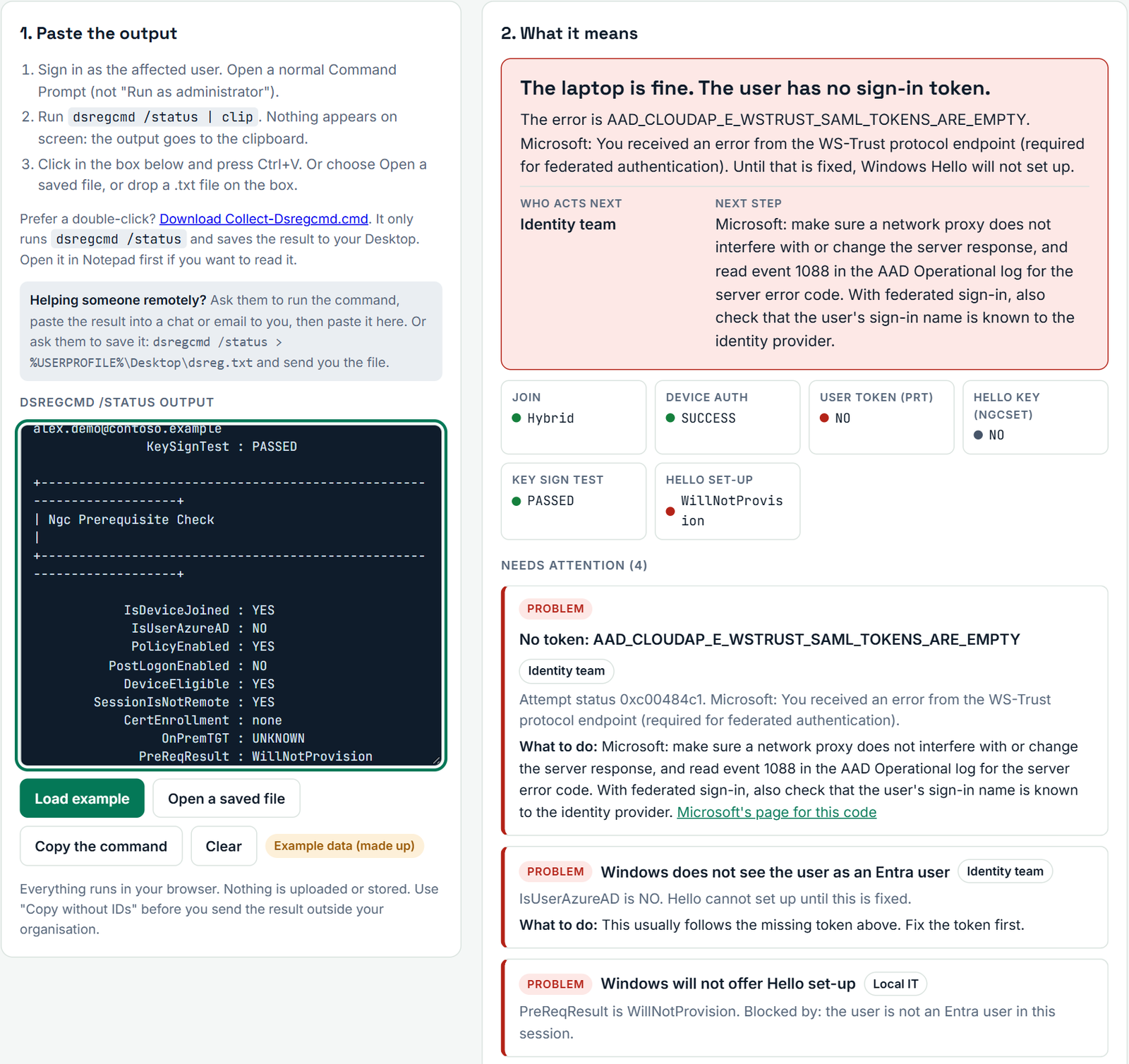
This capture is from one enterprise laptop. The device itself was healthy. The user had no token. Real capture, identifiers removed.
HTTP status 0 and no server error code. But the code is on Microsoft's list. 0xc00484c1 is AAD_CLOUDAP_E_WSTRUST_SAML_TOKENS_ARE_EMPTY, and the cause Microsoft gives is: “You received an error from the WS-Trust protocol endpoint (required for federated authentication).” That is a federation problem, owned by whoever runs identity, not by the network team.
There was a second clue in the same output. The sign-in name in the diagnostics used a different domain suffix from the user's name in Microsoft Entra, and IsUserAzureAD said NO. Microsoft sets that line to YES only “if the logged-in user is present in Microsoft Entra ID”. Windows was asking for a token under a name Entra did not hold for that person.
Is it this message, or a neighbour?
These codes all come from Microsoft's page on primary refresh token issues. The quoted text in the third column is Microsoft's own wording.
| Attempt Status | Microsoft's name | What Microsoft says causes it | Where to start |
|---|---|---|---|
| 0xc000023c | STATUS_NETWORK_UNREACHABLE | Two causes. “The device received a 4xx HTTP error response from one of the following sources:” Microsoft Entra or a WS-Trust endpoint. Or: “A network connectivity issue to a required endpoint exists.” | HTTP status 4xx: identity team, with the server error code from event 1081 (Entra) or 1088 (WS-Trust). No HTTP answer: network team. Event 1022 in the Entra analytic log shows the URL, and event 1084 in the operational log shows the error code from the network stack. |
| 0xc00484c1 | AAD_CLOUDAP_E_WSTRUST_SAML_TOKENS_ARE_EMPTY | “You received an error from the WS-Trust protocol endpoint (required for federated authentication).” | Identity or federation owner. Event 1088 holds the server error code. |
| 0xc004848c | AAD_CLOUDAP_E_HTTP_CERTIFICATE_URI_IS_EMPTY | “The Metadata Exchange (MEX) endpoint is configured incorrectly. The MEX response doesn't contain any certificate endpoint URLs.” | Whoever runs federation. |
| 0xc004844c | AAD_CLOUDAP_E_OAUTH_USERNAME_IS_MALFORMED | “The UPN for the user isn't in the expected format.” | Identity team: check the sign-in name. |
| 0xc000005f | STATUS_NO_SUCH_LOGON_SESSION | “The user realm discovery failed because the Microsoft Entra authentication service can't find the user's domain.” | Identity team: check the domain is verified in Entra. |
| 0xc00000d0 | STATUS_REQUEST_NOT_ACCEPTED | “The device received a 400 Bad Request HTTP error response” | Identity team: read the server error code and look up the AADSTS code. |
| 0xc000006d | STATUS_LOGON_FAILURE | “The device can't connect to the Microsoft Entra authentication service.” | Local IT first: the connection and the operational log. |
The full list, with Microsoft's fix for each code, is on Troubleshoot primary refresh token issues on Windows devices.
Lesson 2: the failure lines mean the token has not renewed since
This capture is from my own laptop, on a day when single sign-on still worked. Real capture, identifiers removed.
The token is present, so the user notices nothing. 0xc000023c is STATUS_NETWORK_UNREACHABLE, and Microsoft gives it two causes: a 4xx error answer from Microsoft Entra or a federation endpoint, or a network connectivity issue. The HTTP lines tell them apart. HTTP status 0 means no server answered, and the HTTP Error line is, in Microsoft's words, the “WinHttp transport error code.” Here it is 0x80072ee7, which is WinHTTP error 12007, ERROR_WINHTTP_NAME_NOT_RESOLVED. Microsoft lists that among “Common general network-related issues.” So this time it really is the network.
My second version of the tool called this a harmless blip. I had noticed that the expiry time sat almost exactly 14 days after the failed attempt (15 seconds out), and assumed the token had renewed seconds later. That was wrong, and Microsoft says so twice. The dsregcmd page says: “The diagnostics information is displayed only if the acquisition or refresh failure happened after the last successful PRT update time”. So the token had not renewed since 26 November, about 44 hours earlier. And the PRT page does not mention 14 days at all: “Once issued, a PRT is valid for 90 days and is continuously renewed as long as the user actively uses the device.”
Why the expiry moved, I do not know, and I could not find a Microsoft page that explains it. The tool no longer guesses.
How to verify: collect the output the right way, then read it in order
Microsoft's instruction is short: “Run the dsregcmd /status utility as a domain user account.” The user lines and the token belong to whoever runs the command, so run it as the affected person, in a normal window.
- Ask the user to open Command Prompt. Not "Run as administrator".
- Run the command below. Nothing appears on screen: the output goes to the clipboard.
- If you are helping remotely, they paste it into a chat or an email to you. Or they save it to a file with the second command and send you the file.
Then read it in this order. The second column is Microsoft's description of each line.
| Line | Microsoft says | Good | Bad |
|---|---|---|---|
| AzureAdJoined | “Set the state to YES if the device is joined to Microsoft Entra ID.” | YES | NO: nothing else can work until the device is joined. |
| DeviceAuthStatus | “SUCCESS if the device is present and enabled in Microsoft Entra ID.” | SUCCESS | FAILED: look at the device record in Entra. |
| AzureAdPrt | “Set the state to YES if a Primary Refresh Token (PRT) is present on the device for the logged-in user.” | YES, with a recent AzureAdPrtUpdateTime | NO: read the Attempt Status under it. |
| Attempt Status | “The client error code that's returned (HRESULT).” | Not shown at all | Any code: look it up in the table above. |
| NgcSet | “Set the state to YES if a Windows Hello key is set for the current logged-in user.” | YES once Hello is set up | NO: read PreReqResult. |
| PreReqResult | “Provides the result of all WHFB prerequisites evaluation.” | WillProvision | WillNotProvision: find the line above it that says NO. |
One line catches people out. PostLogonEnabled NO does not mean Windows Hello is switched off. Microsoft: “If the state is set to NO, it indicates that Windows Hello for Business enrollment is triggered by a custom mechanism.” If you expected the set-up prompt after sign-in, check your Hello policy.
The fix: a free reader that does the reading
The dsregcmd Reader is a single page on EndpointWeekly. It is free, needs no sign-up and runs entirely in your browser. Nothing you paste is uploaded or stored. It reads the codes from Microsoft's list first, and uses the HTTP status only where Microsoft gives a code more than one cause.
- Open the Reader. It starts with made-up example data, so you can see a result straight away.
- Paste the output into the box (it replaces the example), choose Open a saved file, or drop the .txt file on the box.
- Read the verdict at the top, then Who acts next and Next step.
- Click Copy for the ticket, or Copy without IDs before you send it outside your organisation.
- Open Every line of the output, explained when you want to know what a line means.
And this is the Reader's verdict for the token in Lesson 2:
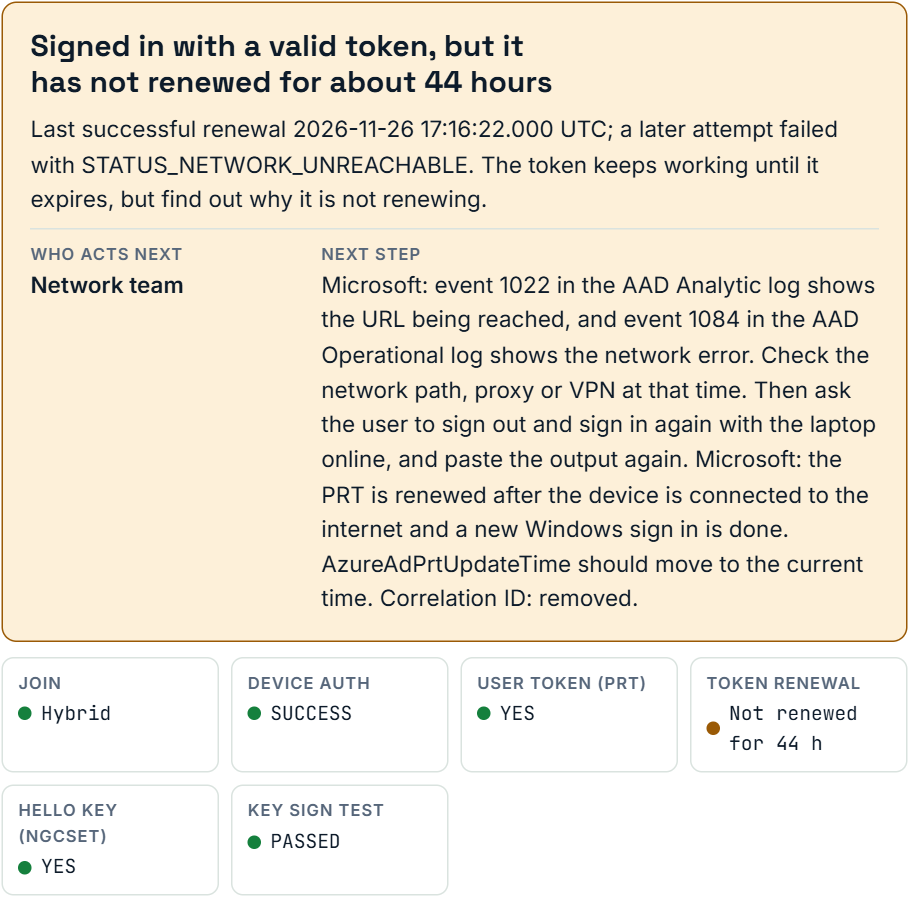
Who acts next is the part I wanted most. Every finding gets an owner:
| Owner | Typical findings |
|---|---|
| Local IT | Run as SYSTEM, the security chip switched off, a failed key signing test, a remote session |
| Network team | Network codes such as 0xc000023c when no server answered (HTTP status 0), and WinHTTP errors such as 12007 |
| Identity team | Federation and sign-in name codes such as 0xc00484c1, 0xc000023c with a 4xx HTTP status, AADSTS errors, a user not present in Entra |
| Endpoint or Intune team | A device that is not joined, Hello not enabled by policy, PostLogonEnabled NO |
| No action | A healthy reading |
Proof it worked: what a good reading looks like
After the owner fixes the cause, ask the user to sign in again with the network connected. Microsoft: “If the user doesn't have internet connection during that time, CloudAP plugin will renew the PRT after the device is connected to the internet and a new Windows sign in is done.” Then collect the output again and paste it in.
- AzureAdPrt says YES.
- AzureAdPrtUpdateTime is close to the time you ran the command.
- No Previous Prt Attempt or Attempt Status lines. Microsoft only shows them when a failure is newer than the last successful update, so their absence is good news.
- The Reader says Looks healthy from this laptop, and Who acts next says No action.
If the update time does not move, the cause is not fixed. Read the new Attempt Status and start again from the table.
References
- Troubleshoot devices by using the dsregcmd command: the meaning of every field quoted here, and when the failure lines are shown.
- Troubleshoot primary refresh token issues on Windows devices: the error codes in the neighbour table, including 0xc00484c1.
- Understanding Primary Refresh Token (PRT) in Microsoft Entra ID: the 90-day validity and the 4-hour renewal.
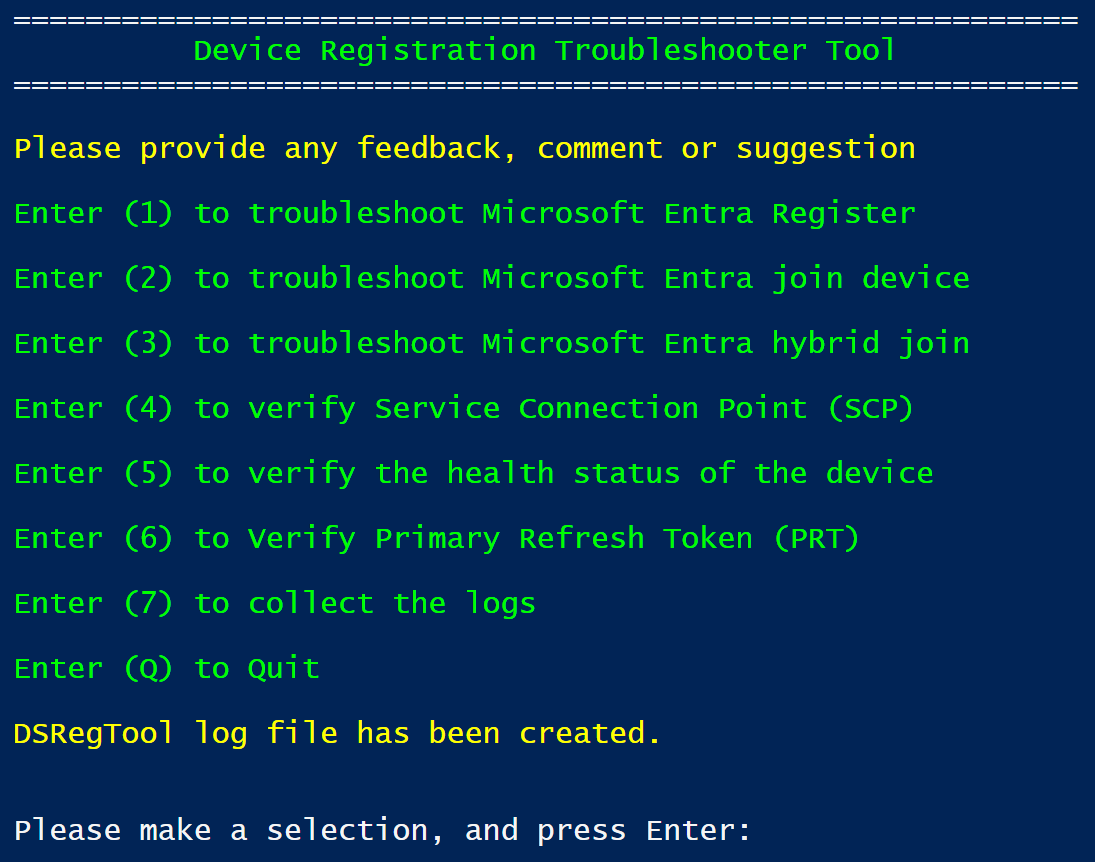
- Device Registration Troubleshooter Tool: the on-device DSRegTool mentioned in this post.
- dsregcmd Reader: the free tool from this post.
- Community Tools: the Reader and the other free tools.
- dsregcmd /status Decoded: The Complete Field Reference for WHfB and PRT: every field in more depth.
- NgcSet Says YES and Windows Hello Still Does Not Work: when the laptop looks healthy but Hello still fails.