Morocco permanently moves to UTC+0 (GMT) on 20 September 2026. Windows devices set to Morocco Standard Time need the September Patch Tuesday update or the interim registry fix before Saturday.
What is changing and when
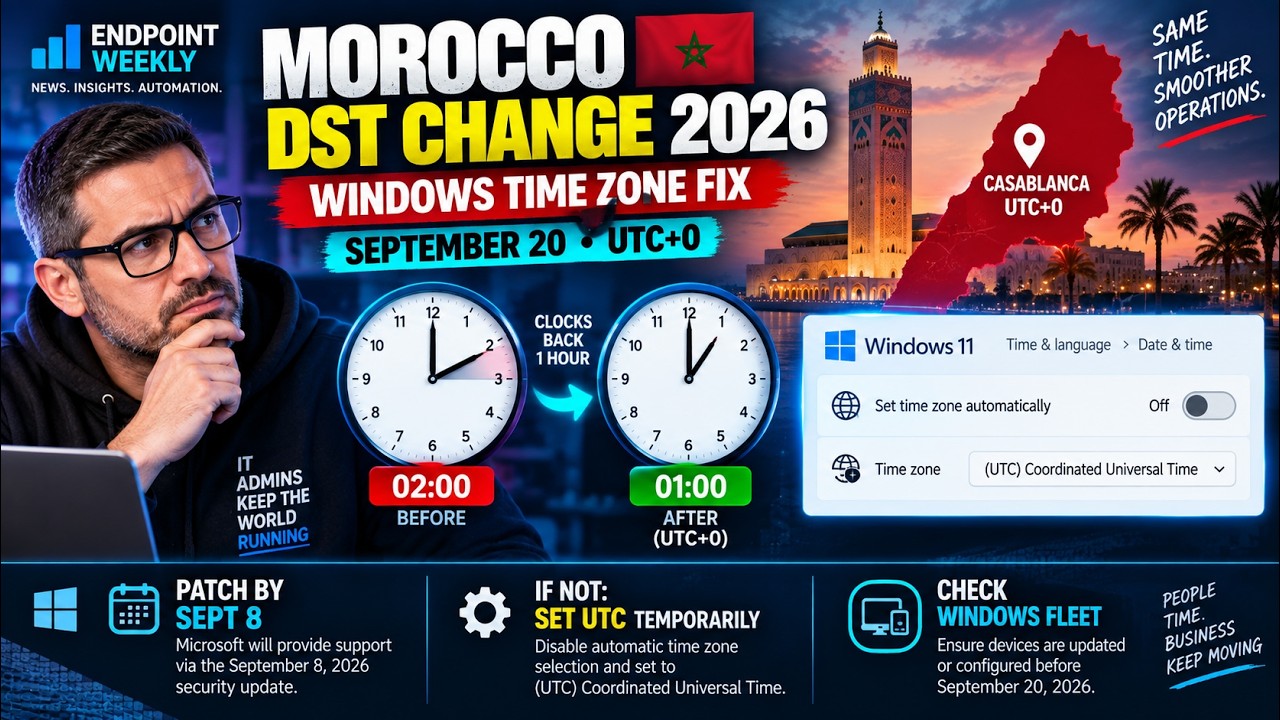
Morocco has announced that it is permanently abolishing Daylight Saving Time and will remain on UTC+0 (Greenwich Mean Time / Western European Time) year-round, starting on 20 September 2026.
Before this change, Morocco observed UTC+1 during its summer period (roughly late March to late September). On 20 September 2026 at 02:00 AM local time, clocks will go back by one hour to 01:00 AM, returning to UTC+0. Unlike previous years, this is not a seasonal transition — Morocco will stay at UTC+0 permanently and will not spring forward again in 2027.
| Before 20 September 2026 | From 20 September 2026 onwards |
|---|---|
| UTC+1 (Western European Summer Time) | UTC+0 (Western European Time / GMT) |
| Windows time zone: Morocco Standard Time (UTC+1 summer rule) | Windows time zone: Morocco Standard Time (updated, permanent UTC+0) |
| Casablanca 12:00 = London 11:00 | Casablanca 12:00 = London 12:00 |
Who is affected
This change affects any Windows device whose clock is set to the Morocco Standard Time zone. In practice this means:
- Windows endpoints in Morocco (physical desktops, laptops) — regardless of whether they are domain-joined, Intune-managed, or standalone
- Windows Server instances in Morocco data centres or with Morocco Standard Time configured
- Exchange Server and Exchange Online hybrid environments where meetings were scheduled based on Morocco Standard Time
- Virtual machines and Azure VMs set to Morocco Standard Time
- Any device anywhere in the world with its time zone set to Morocco Standard Time — for example, a shared device used remotely by someone in Morocco
Devices set to any other time zone (including GMT Standard Time, UTC, or any European zone) are not affected by this change.
What happens if you do nothing
If a device has Morocco Standard Time configured and has not received the updated time zone data, Windows will continue to follow the old DST rules. After 20 September 2026, the device will believe it is still in summer time (UTC+1) when it should be UTC+0. This means:
- The system clock will be one hour fast relative to the real local time in Morocco
- Scheduled tasks will fire at the wrong time
- Outlook calendar meetings will show with a one-hour offset for anyone in Morocco
- Log timestamps will be wrong, making incident correlation harder
The permanent fix: September Patch Tuesday
Microsoft included updated time zone data for Morocco in the September 8, 2026 Patch Tuesday cumulative updates. If a device has installed the September 2026 update, the transition on 20 September will happen automatically and correctly — no admin action required.
To check whether a device has received the September update:
For Intune-managed devices, use the Windows update compliance report in Intune to identify any devices that have not received the September 2026 update. Filter by time zone = Morocco Standard Time to find the specific at-risk devices.
Interim guidance: if you cannot patch before 20 September
If a device cannot receive the September 2026 cumulative update before 20 September, Microsoft has published interim guidance. There are two options depending on your environment.
Option A — Temporarily switch to UTC (quickest)
Set the device to UTC (or Greenwich Standard Time, which is UTC+0 with no DST). Both give the correct offset immediately and neither shifts in October. This requires no update and takes effect straight away.
Once the September 2026 Patch Tuesday update is installed, revert to Morocco Standard Time:
Option B — Apply the registry TZI fix (recommended for servers)
For Windows Server machines or any device where switching to GMT Standard Time is not desirable, Microsoft has published a registry fix that updates the Morocco Standard Time zone data directly. This is the preferred approach for domain controllers and servers because it preserves the time zone name and does not disrupt authentication.
The fix updates the TZI (Time Zone Information) binary value at:
Dynamic DST subkey overrides a hand-edited TZI. Note too that the Windows Time service is W32Time — w32tm is the command-line tool, so Restart-Service w32tm fails with "Cannot find any service" — and restarting it does not reload time-zone data regardless. See the Microsoft DST blog post for the .reg download.Exchange and calendar impact
Calendar meetings and appointments created with Morocco Standard Time as the time zone basis will be affected on unpatched systems:
| Scenario | Impact | Action |
|---|---|---|
| Organiser on patched device, attendee unpatched | Attendee sees meeting 1 hour off | Attendee must patch or apply interim fix |
| Organiser unpatched, attendee patched | Invitation sent with wrong time zone offset | Organiser patches and resends invite |
| Exchange Online (cloud calendar) | Microsoft handles the DST transition automatically | No action required |
| Exchange Server on-premises | May need the Exchange Server interim update for correct free/busy data | Apply appropriate Exchange Server interim update |
| Recurring meetings spanning 20 September | Post-transition occurrences may show 1-hour offset | Meeting organisers resend updated invitations after patching |
How to verify the correct time after the change
After applying the patch or interim fix, verify that the device is showing the correct UTC offset for Morocco Standard Time:
For further reading on this change and the official interim guidance including the registry .reg file download:
- Interim guidance for Morocco DST change 2026 (Microsoft Tech Community)
- KB914387: How to configure daylight saving time for Microsoft Windows operating systems
- Microsoft daylight saving time help and support
Last updated: 17 September 2026. This post will be updated when Microsoft publishes additional guidance or a dedicated DST-only update KB.