Somebody in your organisation turned on hotpatching. August is a hotpatch month. The change record says the security update went out, the Intune blade is green, and you want to close the ticket. So you open winver on a sample device, see a build number that is higher than last month's, and tick the box.
That reasoning is broken, and the way it is broken is specific and provable. On 11 August 2026 Microsoft shipped two different packages for Windows 11, version 25H2. The hotpatch put eligible devices on build 26200.9106. The standard cumulative update put everybody else on build 26200.9168. Same Patch Tuesday. Sixty-two revisions apart. The hotpatched device is the one with the lower number.
Microsoft documents that hotpatching "patches the in-memory code of running processes without the need to restart the process", and that the hotpatch package is scoped to security fixes only. That means a hotpatched device and an LCU device diverge onto different build numbers in the same month - in August 2026, 26200.9106 versus 26200.9168 - so a rising UBR is not evidence of a hotpatch, and in a hotpatch month a higher UBR is evidence you got the full cumulative update instead. Microsoft publishes no single on-device "hotpatch is in effect" indicator for Windows client: the documented device-side checks (Configured update policies, the AllowRebootlessUpdates event string, VBS state) prove eligibility and enrolment, not application. The defensible answer is a five-gate evidence chain - version, VBS, enrolment, installed KB matched against the published hotpatch build, and the inbox monitor's health events - closed off by the service-side Hotpatched column in the Intune report. And do not reach for Get-HotFix: on the 25H2 device used for this article it returns four rows while the component store holds 121 installed packages.
The problem: the build number is the wrong witness
Every patch-compliance habit an endpoint engineer has was built on one assumption: the OS revision number is a monotonic proxy for "how patched am I". Higher is newer. Newer is safer. Report the number, close the ticket.
Hotpatching breaks that assumption on purpose, and it does so quietly. There is no error, no failed install, no red banner. The number goes up. It just goes up to the wrong place.
Here is the August 2026 evidence, straight from the two support articles. Both were published on 11 August 2026, for the same two Windows 11 releases.
| Package | Type | 25H2 build | 24H2 build | Restart |
|---|---|---|---|---|
KB5120994 | Hotpatch | 26200.9106 | 26100.9106 | Not required |
KB5121003 | Monthly security update (LCU) | 26200.9168 | 26100.9168 | Required |
Read that table the way a compliance script reads it. A script asserting UBR -ge 9168 marks every correctly hotpatched device in the fleet as non-compliant. A script asserting UBR -gt 9106 passes a hotpatched device and also passes the device that ignored hotpatch entirely and took the reboot. Neither script is measuring hotpatch state. Both are measuring something else and calling it hotpatch state.
The device I used to write this article is a live Windows 11 Enterprise 25H2 machine. Here is what it actually reports.
Four things in that output deserve attention, and only one of them is the answer to our question.
UBR = 9168 is the finding. In a documented hotpatch month, this device landed on the cumulative-update revision. Whatever else is true, this machine did not apply the August hotpatch.
ProductName = "Windows 10 Enterprise" on a Windows 11 machine is a real, longstanding registry quirk. Any detection script that gates on ProductName to identify Windows 11 fails silently here. Use CurrentBuild (22000 or higher) or DisplayVersion.
ReleaseId = 2009 is frozen at the Windows 10 20H2 value and is useless for version detection on any modern build.
BuildLabEx = 26100.1...ge_release.240331-1435 is a 24H2 lab string sitting on a 26200 build, which looks like evidence of an in-place move from 24H2 to 25H2. It is not. 24H2 and 25H2 share a common servicing core with an identical set of system files, and 25H2 is switched on by an enablement package - so BuildLabEx reads 26100.1 on every 25H2 device, including ones imaged directly from 25H2 media. Do not use it to infer install history.
wuauserv, rename SoftwareDistribution, reset the datastore, force a re-scan. Do not. The Windows Update datastore is the only per-device record of which KB installed and when, and the update history exposed through wuapi.dll reads from it. Rename that folder and you have deleted the single piece of evidence that distinguishes a hotpatched device from an LCU device. Collect the history first, in the read-only order below, and only then consider touching anything.So the three questions that actually need answering are these, and none of them is "what does winver say".
- Is this device eligible for hotpatch at all - correct release, correct licence, VBS running, CHPE handled?
- Is it enrolled - is the policy actually landing on it, as opposed to landing on a group it is not a member of?
- Did the hotpatch for this specific month install - and can I name the KB and the build that proves it?
Why it happens: hotpatch changes memory, the baseline changes the build
The mechanism is documented, and it is worth reading the exact wording rather than a paraphrase. Microsoft's Windows Server hotpatch page states: "Hotpatching patches the in-memory code of running processes without the need to restart the process." The same page lists as a benefit that "Fewer binaries mean updates install faster and consume less disk and CPU resources."
That is the whole story in two sentences. A standard cumulative update replaces on-disk binaries, which is why it needs a restart - a file that is mapped into a running process cannot simply be overwritten. A hotpatch delivers a much smaller payload and takes effect against code that is already loaded, so the fix is live immediately.
Two consequences follow, and they are the reason your instincts mislead you.
First: a hotpatch is scoped. Microsoft documents that hotpatch "covers Windows Security updates and maintains parity with the content of security updates issued to in the regular non-Hotpatch Windows update channel", and lists explicitly what is not in the programme: "Nonsecurity updates for Windows", ".NET updates", and "Non-Windows updates, such as drivers, firmware updates, and so on."
Second: because the hotpatch content is a subset, its build stamp is its own. The hotpatch KB is a real package with a real revision number, and Microsoft "combines the latest servicing stack update (SSU) for your operating system with the Hotpatch update". So the UBR does move on a hotpatched device - it just moves onto a parallel track that is numerically lower than the LCU track, because it carries less.
The baseline cycle, in exactly the detail verification needs
The cadence itself is covered elsewhere. What matters for verification is the single rule that determines which build number you should be comparing against.
Quarterly, Microsoft ships a baseline. A baseline "Includes the latest security fixes, cumulative new features, and enhancements. Restart required." For the two months following, devices get hotpatches: "Includes security updates. No restart required." The planned pattern is January, April, July and October as baselines, with the intervening months as hotpatch months.
And then the rule that trips people up. Microsoft documents that an unplanned baseline can be inserted: "Occasionally, for security reasons, there can be baseline updates that require a restart outside of the planned quarterly schedule. If this happens, the existing planned baseline update cadence does not change. For example, if June becomes a baseline update, July will still also be a baseline update."
2026 is exactly that year. The 25H2 hotpatch release notes list June 2026 (KB5094126) and July 2026 (KB5101650) as baselines. July's baseline landed devices on builds 26200.8875 and 26100.8875. August was the next hotpatch month.
The practical consequence: you cannot compute the expected build number for a hotpatch month from a formula. You have to look up the published hotpatch KB for that month and read its build off the article title. Any compliance rule with a hard-coded arithmetic expectation will be wrong the first time an unplanned baseline appears.
What the registry can and cannot tell you
These are the values every compliance script reads, and what each one is actually worth for this question. Shared parent key:
| Value | Meaning | What to look for |
|---|---|---|
CurrentBuild | Major build of the installed release. 26100 = 24H2, 26200 = 25H2. | Must be pinned alongside UBR. On its own, useless; combined with UBR, it is the only safe pair. |
UBR | Update Build Revision - the fourth digit group, moved by whichever servicing payload last installed. | Compare against the published hotpatch build for that month, not against last month's value. In August 2026: 9106 means hotpatch, 9168 means LCU. |
DisplayVersion | The marketing release string - 24H2, 25H2. | The reliable release discriminator. Note that hotpatch requires "Windows 11, version 24H2 or later". |
ProductName | Legacy product string. | Reads Windows 10 Enterprise on Windows 11. Never gate Windows 11 detection on this. |
ReleaseId | Legacy release identifier. | Frozen at 2009. Ignore it entirely. |
BuildLabEx | Build-lab string stamped at OS install time. | Does not move with cumulative updates. A 26100 lab string on a 26200 build proves the device was upgraded in place rather than reimaged - which is how it may have left the hotpatch cycle. |
KB5121003 is build 26200.9168 on 25H2 and 26100.9168 on 24H2 - the same UBR on two different releases. A rule that tests UBR -ge 9168 without also pinning CurrentBuild will pass a 24H2 device against a 25H2 baseline and report it compliant. The UBR is not globally unique. Always test the pair.Why Get-HotFix is not a hotpatch verification tool
This one deserves its own warning, because Microsoft's own Windows Server hotpatch page says "You can also view installed patches by running the Get-HotFix cmdlet in PowerShell" - and on a Windows 11 client that advice will quietly mislead you.
Get-HotFix is a wrapper over the Win32_QuickFixEngineering WMI class, and that class's documentation is explicit about its scope: "This class returns only the updates supplied by Component Based Servicing (CBS). These updates are not listed in the registry. Updates supplied by Microsoft Windows Installer (MSI) or the Windows update site are not returned by Win32_QuickFixEngineering." The Remarks section adds another caution: "Because updates are stored in two places, an enumeration of this class can result in duplicates."
Here is what that scoping looks like in practice on the 25H2 device.
Four rows against 121 installed packages. If your hotpatch attestation is "the KB does not appear in Get-HotFix, therefore it did not install", you have built a reporting pipeline on a cmdlet that is documented to show you a subset. It is a fine tool for spotting the LCU. It is not an inventory.
Incidentally, those four rows are informative in their own right. KB5121003 is the August 2026 LCU. KB5123304 is the servicing stack update that shipped inside it (the stack moved to 10.0.26100.9156 - note a 26100 stack on a 26200 build, which is normal and not a fault). KB5120708 is a .NET Framework cumulative update - a category Microsoft documents as explicitly outside the hotpatch programme. And KB5054156, installed on 4 February 2026, is the Windows 11 25H2 enablement package. Remember that date.
The binaries doing the work
Knowing which process owns which step tells you which log to read. These paths were all confirmed on the 25H2 device rather than assumed, because several of them are widely reported wrongly.
| Binary | Role | Where it actually lives |
|---|---|---|
wuaueng.dll | The Windows Update agent itself; the ServiceDll for wuauserv, which runs as svchost.exe -k netsvcs -p under LocalSystem. | C:\Windows\System32. Version on this device: 1509.2607.1012.0 - note it is versioned completely separately from the OS build 10.0.26200.9168. |
wuapi.dll | Hosts the Windows Update Agent COM API, including IUpdateSearcher and its QueryHistory method. This is what the update-history query in the next section actually calls. | C:\Windows\System32. |
MoUsoCoreWorker.exe | Update Session Orchestrator worker - the process that drives scan, download and install sessions. | C:\Windows\UUS\amd64, not System32. UUS is the Unified Update Stack and is serviced independently of the OS build. |
TrustedInstaller.exe | FileDescription "Windows Modules Installer" - the CBS service that commits package state changes. | C:\Windows\servicing\, alongside CbsApi.dll, CbsMsg.dll and wrpintapi.dll. |
TiWorker.exe and cbscore.dll | FileDescription "Windows Modules Installer Worker", plus the CBS core. These do the package work and write CBS.log. | The versioned WinSxS servicing-stack component directory - not C:\Windows\servicing and not System32. A real CBS.log line reads: "Loaded Servicing Stack v10.0.26100.9156 with Core: ...\cbscore.dll". |
poqexec.exe | FileDescription "Primitive Operations Queue Executor" - executes the queued file operations that a reboot-based update needs, because mapped files cannot be replaced in place. | C:\Windows\System32. |
That last row is conceptually the crux of hotpatching: poqexec.exe exists because on-disk binary replacement needs a boot-time window. A hotpatch is precisely the servicing path designed not to need one.
poqexec.log recorded queue creation and validation twenty-one times across two days on a machine with no pending reboot at all - the log records the online session building and validating a queue, not proof that a queue executed at boot. It is neither a hotpatch signal nor a pending-reboot signal.How to verify: a five-gate evidence chain
Now the honest part, because the brief for this article was to find Microsoft's documented on-device verification method and there is a limit to what exists.
Microsoft does not document a single on-device indicator that says "hotpatch KB-nnnnnnn is currently in effect" for Windows client. The troubleshooting guidance published on both the Intune and Windows Autopatch hotpatch pages is a six-step sequence, and reading it closely, steps 2, 3, 4 and 5 all confirm eligibility and enrolment. Step 1 tells you to check the release calendar. Step 6 tells you to text-search the Application log for the word "hotpatch". There is no Get-HotPatchStatus, no CIM class, no documented registry value that reports applied hotpatch state on a client.
What you can build instead is an evidence chain where each gate has a documented source, and where failing any gate is itself a conclusive answer. Run them in this order, all read-only, and stop at the first failure - the first failure is the root cause.
Read CurrentBuild, UBR and DisplayVersion as one unit, as in the first console block above. If DisplayVersion is below 24H2, you are finished - the device is not a hotpatch candidate and everything downstream is noise.
Microsoft documents two ways to read it. The GUI route is msinfo32: under System Summary, find Virtualization-based security and confirm the value reads Running. The scriptable route is the Win32_DeviceGuard WMI class.
Value 1 is the one that costs people a week. "Enabled but not running" means policy set it and the platform did not bring it up. A script that tests VirtualizationBasedSecurityStatus -ne 0 reports that device as fine, and the device silently receives LCUs forever.
There is a satisfying cross-check here. The diagnostic event payload Microsoft publishes in its own troubleshooting step 5 contains "vbsState": 2 alongside the enrolment flags - the same numbering as the WMI property. When your Win32_DeviceGuard query and the orchestrator's own telemetry agree on 2, you have two independent sources for the same gate.
The registry values behind that state, for when you need to know why it is 1 instead of 2. Shared parent key:
| Value | Meaning | What to look for |
|---|---|---|
EnableVirtualizationBasedSecurity | DWORD. Turns VBS on. | 1. If this is 1 but the WMI status is 1 rather than 2, the platform is refusing - look at firmware, Secure Boot and driver compatibility, not at policy. |
RequirePlatformSecurityFeatures | DWORD. 1 = Secure Boot required, 3 = Secure Boot and DMA protection required. | 3 silently excludes any machine without an IOMMU. Microsoft's guidance is that in most situations 1 is the right choice. |
Locked | DWORD. 1 = UEFI lock. | 0 unless you deliberately want a firmware-level lock. With 1 you cannot back the setting out remotely. |
Mandatory | DWORD. Stops the OS loader continuing if the hypervisor or secure kernel fails to load. | Normally absent. If present and set, a VBS component failure becomes a boot failure. |
Scenarios\HypervisorEnforcedCodeIntegrity\Enabled | DWORD in the child key. Memory integrity (HVCI). | 1 for memory integrity. Note hotpatch requires VBS; memory integrity is a separate scenario on top of it. |
On Arm64 there is one extra eligibility gate, in a different hive entirely. Microsoft documents that "Hotpatch updates aren't compatible with servicing CHPE OS binaries", and requires the CHPE disable flag be set once, followed by a restart:
"You only need to set this flag one time. The registry setting remains applied through updates." The documented policy equivalent is the DisableCHPE node of the System policy CSP. This applies to Arm64 only - "AMD and Intel CPUs don't have CHPE" - so on an x64 fleet, an absent HotPatchRestrictions value is not a finding.
Enrolled. Not applied. That page tells you the intent reached the device, which is genuinely useful and genuinely not the same as the fix being in memory.
The scriptable equivalent Microsoft documents is an Event Viewer text filter, not a CSP read. Step 5 of the troubleshooting sequence says to search for AllowRebootlessUpdates and shows the payload shape to expect:
Update/AllowRebootlessUpdates as though it were a supported Policy CSP node. I checked the public Policy CSP - Update reference on learn.microsoft.com and AllowRebootlessUpdates does not appear on it - there are no hotpatch-related policies documented on that page at all. The string exists in Microsoft's documentation only as a value inside a diagnostic event payload. Treat it as an observable signal you may read from the event log, not as a configuration surface with a documented schema you can depend on across releases.The update history is exposed through the Windows Update Agent COM API in wuapi.dll. IUpdateSearcher::QueryHistory takes a startIndex and a count and returns an IUpdateHistoryEntryCollection containing, in Microsoft's words, "matching event records on the computer in descending chronological order".
The properties available on each entry are documented on the IUpdateHistoryEntry interface: Title, Date, Operation, ResultCode, HResult, UnmappedResultCode, ClientApplicationID, ServerSelection, ServiceID, SupportUrl and UpdateIdentity. ClientApplicationID is quietly one of the most useful - it tells you which agent processed the install, which is how you separate an Autopatch-orchestrated install from someone clicking "Check for updates".
KB\d{7} and ignores everything else, deliberately. Microsoft's catalogue title format for LCUs is stable and predictable; I have not verified an equivalent published title convention for hotpatch packages, so a script matching on the literal word "Hotpatch" in a title is a script resting on an assumption. Look up the month's hotpatch KB number from the release notes and match that identifier exactly.The second source is the component store, which is independent of the Windows Update datastore and therefore survives a datastore reset. Get-WindowsPackage -Online "Gets information about packages in a Windows image", with -Online meaning "the operating system that is currently running on the local computer".
Two sources agreeing is the standard to hold yourself to. History says LCU, inventory says LCU, build number says 9168 not 9106. That is a conclusion you can defend in a change review.
That last clause is the single most important sentence in the whole hotpatch documentation set for anyone doing verification, because it describes an automatic, silent demotion from hotpatch to LCU. The device does not fail. It quietly switches lanes and reboots on the next LCU, and your build-number check reports it as extra-compliant.
The documented method for finding those events is a text filter: right-click Start, open Event Viewer, and "Search for hotpatch in the filter to view the logs". There is no published event ID catalogue for the hotpatch monitor - I looked, and Microsoft does not provide one. So the honest guidance is: filter on the word, in the Application log, and read what you find.
What Microsoft does effectively let you correlate is the servicing path itself. These event IDs were observed on the live 25H2 device, and they distinguish a reboot-based install from a rebootless one. Channels stated per row because two logs are involved.
| Event ID | Message (as observed) | What it tells you |
|---|---|---|
| 2 Setup log | "Package <KB> was successfully changed to the Staged state" | CBS accepted the payload but has not committed it. Staged is not installed. A device sitting on Staged for a KB you believe is applied is your answer. |
| 4 Setup log | "A reboot is necessary before package <KB> can be changed to the Installed state" | The definitive reboot-required marker, and the opposite of hotpatch behaviour. Observed here for KB5120708, the .NET Framework CU - a category documented as outside the hotpatch programme, so this is expected, not a fault. |
| 26 WindowsUpdateClient/Operational | "Windows Update successfully found N updates" | Proof the agent completed a scan. Read the next row before you trust it for anything else. |
| 41 WindowsUpdateClient/Operational | "An update was downloaded" | Content arrived. Pairs with Setup Event 2 to show download-then-stage. Neither event proves commit. |
| 1013 / 1014 Setup log, provider Microsoft-Windows-Servicing | Corruption detect / complete pair | Only relevant if you suspect the component store is why nothing commits. "Detection Only: 1" in the payload distinguishes a ScanHealth pass from a RestoreHealth pass. |
TargetReleaseVersion pin emit an identical line. On the device here, policy sets TargetReleaseVersion = 1 and TargetReleaseVersionInfo = 24H2 while DisplayVersion reads 25H2 - the pin has been overtaken by an installed enablement package and is now describing a state the device left months ago. A stale pin is one of the ways a device stops being offered the current baseline, which is gate 1, which means no hotpatch. Check the pin against the installed release, not against your intent.The fleet-level gate
Everything above is per-device. For a fleet, the closest thing to an authoritative "it applied" statement is service-side: the Hotpatch quality updates report, reached via Reports > Windows Autopatch > Windows quality updates > Reports tab > Hotpatch quality updates. Its Hotpatched column is documented as "Total devices that successfully received a Hotpatch update".
That is Microsoft asserting application, not enrolment - the strongest wording available anywhere in the documentation set. Two caveats before you treat it as ground truth: "The data in this report is refreshed every four hours", and the trend view covers the last 90 days. A device patched an hour ago is legitimately absent from the count.
The fix: repairing each gate, and the four ways a device falls off
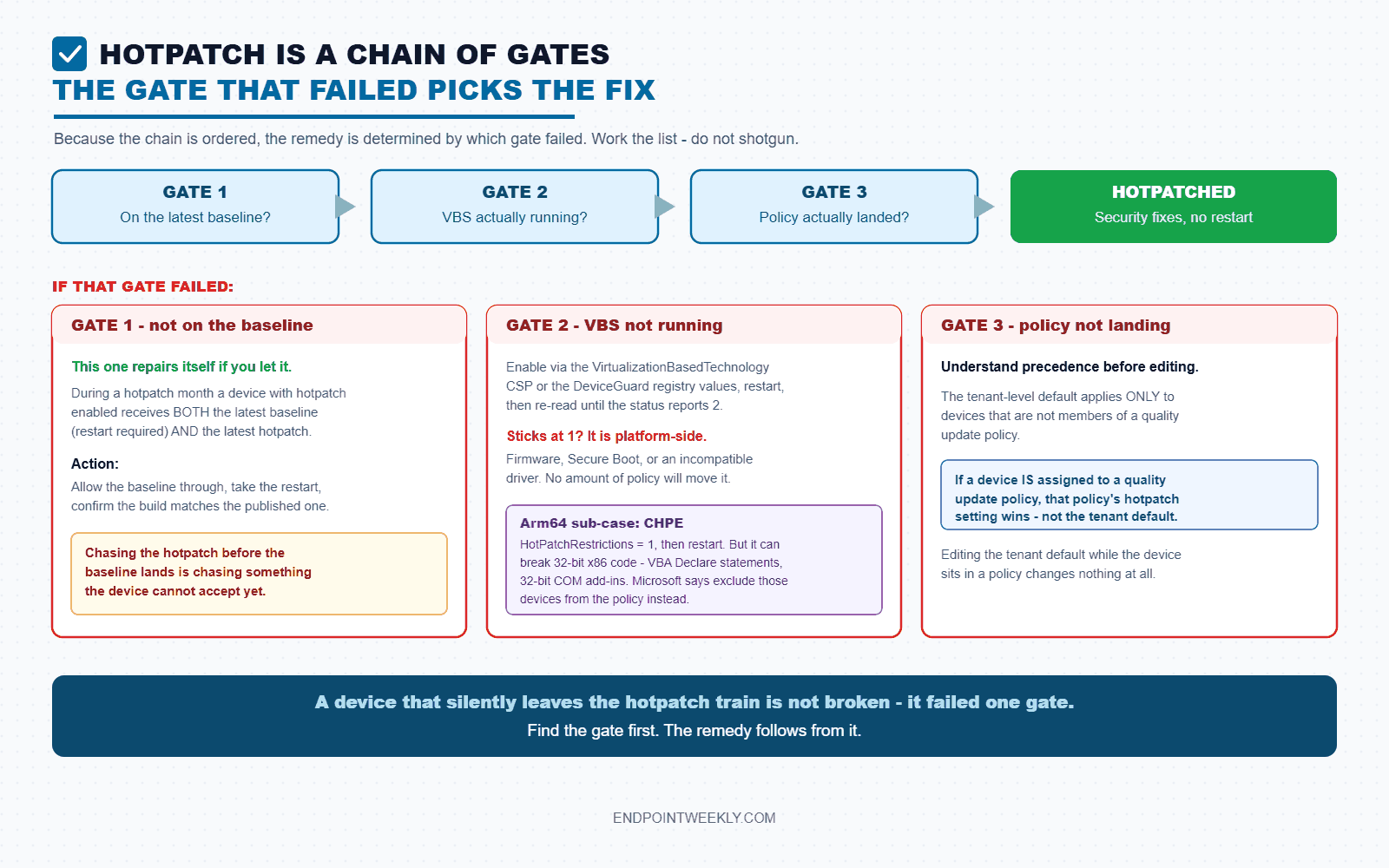
Gate 1 failed - not on the latest baseline. This one repairs itself if you let it. Microsoft documents the behaviour precisely: "During a hotpatch month, if a device has hotpatch updates enabled but isn't on the latest baseline update, the device will receive both the latest baseline update (restart required) and the latest hotpatch update." The action is to allow the baseline through, take the restart, and confirm the build matches the published baseline build. Chasing the hotpatch before the baseline lands is chasing something the device cannot accept yet.
Gate 2 failed - VBS not running. Enable VBS via the VirtualizationBasedTechnology policy CSP, or the DeviceGuard registry values in the table above, then restart and re-read VirtualizationBasedSecurityStatus until it reports 2. If it sticks at 1, the problem is platform-side - firmware, Secure Boot, or an incompatible driver - and no amount of policy will move it. Microsoft also surfaces this at fleet scale: the Autopatch alerts and remediation view carries a dedicated Hotpatch - VBS not running alert, which is a far better way to find the affected population than scripting across the estate.
Gate 2 failed on Arm64 - CHPE. Set HotPatchRestrictions = 1 under the Memory Management key, or use the DisableCHPE System policy CSP, and restart once. Read the documented warning before you deploy it broadly: disabling CHPE can cause "Application failure or performance issues", specifically for 32-bit x86 code such as "VBA code using Declare statements or 32-bit COM Add-ins with no 64-bit alternative". Microsoft's recommended alternative is blunt and correct - "identify the devices that must run these programs and exclude them from your hotpatch quality update policies". To reverse it, clear the flag (HotPatchRestrictions=0) and restart.
Gate 3 failed - policy not landing. Understand the precedence before you edit anything. There is a tenant-level default and there are per-policy settings, and the documentation is unambiguous about which wins: "The default tenant setting is only applied to devices that aren't members of a quality update policy" and "If a device is assigned to a quality update policy, the hotpatch setting from that policy is the one applied." So a device inside a quality update policy whose hotpatch setting is Block will ignore an Allow at tenant level entirely. The setting to look for is When available, apply without restarting the device ("hotpatch"), set to Allow.
HotPatchTableSize DWORD under the Memory Management key and a Hotpatch.amd64 enrolment-package key under ...\CurrentVersion\Update\TargetingInfo\DynamicInstalled, with a Name value of "Hotpatch Enrollment Package". Those steps are documented for Windows Server 2022 Datacenter: Azure Edition deployed from ISO. They are not part of the documented Windows 11 client prerequisites, and there is no Microsoft guidance saying they do anything on a client. Writing them onto a managed Windows 11 fleet is unsupported configuration drift that will make your next escalation harder, not easier.The four documented ways a device silently leaves the hotpatch train
All four are in Microsoft's own text. None of them produces an error on the device. Every one of them is invisible to a build-number check.
1. A feature-version upgrade during a hotpatch month. This is the big one, and the wording is explicit: "If you upgrade devices during a baseline month, they remain on the hotpatch cycle and keep receiving the hotpatch updates seamlessly. If you upgrade a device to the latest Windows version in a hotpatch month, it switches to standard updates. In this case, you must restart the device to apply the update. Hotpatch updates resume after the following baseline update."
The device I used for this article contains exactly that event in its own history. KB5054156 - the Windows 11 25H2 enablement package - installed on 4 February 2026. February 2026 was a hotpatch month (KB5077212). The BuildLabEx value of 26100.1.amd64fre.ge_release.240331-1435 on a 26200 build independently corroborates the in-place move from 24H2 to 25H2. I have no evidence this particular machine was ever enrolled in a hotpatch policy - but if it had been, 4 February is the date it would have dropped to standard updates, and it would have stayed there until the April baseline. Nothing on the device would have said so.
The operational lesson: schedule enablement-package and feature-update rollouts into baseline months. It costs nothing and preserves the cycle.
2. The health monitor found a critical error. "If there's a critical error, the device installs the standard (LCU) update to ensure the device is fully secure." An automatic, deliberate, silent demotion. The only place it surfaces on the device is the Application log, under a text search for "hotpatch".
3. An eligibility gate lapsed. "Devices that don't meet one or more prerequisites automatically receive the Latest Cumulative Update (LCU) instead." Note the word automatically, and note that the documentation calls this state temporary: "Devices might be temporarily ineligible because they don't have VBS enabled or aren't currently on the latest baseline release." Someone turning off memory integrity to chase a driver problem is enough to do it.
4. An unplanned baseline replaced the hotpatch. A zero-day that cannot ship as a hotpatch becomes a baseline, and that month's hotpatch does not exist. The device correctly takes a reboot-requiring update in what your calendar says is a hotpatch month. This is not a fault, and 2026 saw it happen with the June baseline.
If you need to reverse a hotpatch
Know the constraint before you promise anyone a rollback: "Automatic rollback of a hotpatch update isn't supported but you can uninstall them." The documented procedure is to uninstall the hotpatch, install the latest standard cumulative update, and restart. Microsoft adds the practical note that "Uninstalling a hotpatch update is quick, however, it requires a device restart" - so the rebootless benefit is one-directional. There is no rebootless way out.
Proof it worked: reading a real verdict on a real device
Here is the whole chain as one read-only collector. Nothing in it writes, stops a service, or touches the datastore, so it is safe to run before you have decided anything. Set the two expected values at the top from the month's published KB - that is the part that must not be hard-coded permanently.
Run against the 25H2 device this article was written on, the chain returns an unambiguous answer, and it disagrees with the naive build check in exactly the way predicted.
Notice what the naive check would have said. UBR went from 8875 in July to 9168 in August. It went up by 293. Every "is it patched" dashboard in the world turns that green. And the device did not apply the hotpatch.
The full chain, and what each gate is actually worth as evidence:
| Gate | What it proves - and what it does not | This device |
|---|---|---|
| 1. Release and baseline | Proves candidacy. Does not prove enrolment or application. | Pass - 25H2, build 26200 |
| 2. VBS running | Proves a hard prerequisite is met. Value 1 masquerades as a pass in careless scripts. | Pass - status 2 |
3. Configured update policies / AllowRebootlessUpdates | Proves the policy reached the device. Microsoft's own word is "enrolled". Never read it as "applied". | Not evidenced |
| 4. Installed KB and matching UBR | The only device-side gate that speaks to application. Requires the month's published hotpatch KB and build as inputs. | Fail - LCU KB5121003, UBR 9168 not 9106 |
| 5. Monitor events | Catches the silent demotion to LCU. No published event ID catalogue - text filter only. | No hotpatch events |
| Fleet: Intune Hotpatched column | The only place Microsoft documents an assertion of successful application. Refreshed every four hours. | Would not count this device |
KB5120994 / .9106 and KB5121003 / .9168. A device on the first is hotpatched. A device on the second is compliant but rebooted. A device on neither has a problem. One extra column turns an unanswerable question into a lookup - and it is the only version of this check that survives an unplanned baseline.The deeper point is about what "verified" means. Hotpatching is a genuinely good change: smaller payloads, fixes live in memory in minutes, users not rebooted mid-afternoon. But it decouples "is this device protected" from "what number does this device report", and every tool built over the last decade encodes the assumption that those are the same question. They are not, and the gap does not announce itself. It just sits there, quietly green.
References
- Hotpatch updates - Windows Autopatch - prerequisites, VBS and CHPE requirements, ineligible-device behaviour, release cycles, the six-step troubleshooting sequence.
- Use hotpatch with Windows quality updates - Microsoft Intune - tenant setting versus quality update policy precedence, the
HotPatchRestrictionskey, rollback, theAllowRebootlessUpdatespayload. - Hotpatch for Windows Server - the in-memory mechanism statement, planned versus unplanned baselines, and the documented list of update types outside the hotpatch programme.
- Hotpatch quality update report - the Hotpatched column definition and the four-hour refresh interval.
- Enable memory integrity -
Win32_DeviceGuard,VirtualizationBasedSecurityStatusvalues, the DeviceGuard registry keys, and msinfo32 validation. - Win32_QuickFixEngineering class - the documented CBS-only scope that makes
Get-HotFixan incomplete inventory. - IUpdateSearcher::QueryHistory and IUpdateHistoryEntry - the update-history API in
wuapi.dlland its entry properties. - Get-WindowsPackage - package inventory of the running OS.
- Update release cycle for Windows clients - the B-release and LCU definitions.
- Policy CSP - Update - checked, and confirming that
AllowRebootlessUpdatesis not a documented Update CSP node. - August 11, 2026 - Hotpatch KB5120994 (OS Builds 26200.9106 and 26100.9106) - the hotpatch build for the month, and the SSU-combination note.
- August 11, 2026 - KB5121003 (OS Builds 26200.9168 and 26100.9168) - the LCU build for the same month. Compare the two titles; that comparison is the whole article.
- Release notes for Hotpatch on Windows 11 Enterprise version 25H2 - which 2026 months were baselines and which were hotpatch.