For years, Windows Hello for Business (WHfB) was the passwordless credential for signing in to Windows and Microsoft services. But the world moved to passkeys — the same FIDO2 cryptography, now the mainstream way to log in to any website. The good news for endpoint teams: Windows Hello is already a passkey provider. Windows can create, store, and use passkeys with the device's PIN or biometric, and in Windows 11 24H2 it gained the controls enterprises need to govern them. This closing post in the series maps where WHfB ends and the Windows passkey story begins.
Watch on YouTube · Subscribe at @EndpointWeekly
Windows Hello for Business is already a passkey provider — the same PIN or biometric your users use for Windows sign-in now unlocks passkeys for the entire web. Windows 11 22H2 added native passkey management and 24H2 added per-app privacy consent controls. The registry key HKCU\Software\Microsoft\Passkeys\LocalToggleStatus governs whether a user can store passkeys on the device. If your fleet is already on 24H2 with WHfB deployed, enabling passkey governance is mostly turning on controls you are already ready for.
The problem: WHfB and “passkeys” sound like the same thing (they mostly are)
Admins get confused because WHfB, FIDO2 security keys, and passkeys all use the same underlying FIDO2 public/private key cryptography. The useful mental model: a passkey is a FIDO2 credential for signing in to a website or app, and Windows Hello is one of the providers that can hold and unlock those passkeys — using the exact same PIN or biometric gesture your users already have for WHfB. WHfB signs you in to Windows and Entra; Windows-Hello-provided passkeys sign you in to the wider web. Same unlock, different relying parties.
Why it happens: the same gesture now covers the whole web
The private keys behind passkeys can only be used after the user unlocks them with their Windows Hello factor — biometric or PIN. That means every investment you made in WHfB (TPM-backed keys, the PIN complexity policy, biometric enrolment) now also protects the user's passkey sign-ins to third-party sites. You are not deploying a second thing; you are extending the first. And because passkeys are phishing-resistant and unique per site, they eliminate the reused-password risk WHfB never touched (WHfB only covered your own sign-in).
How to verify: check a device's passkey capability and registry state
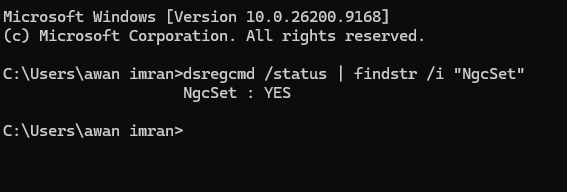
Passkey capability tracks the Windows build. Confirm the version and that Hello is set up (Hello is the unlock factor for Windows-provided passkeys):
The HKCU\Software\Microsoft\Passkeys key exists on any 24H2 device with passkey capability. The most common value you will see is LastHeartbeatEpochDay — a system-managed counter Windows updates as the passkey service runs. The opt-out flag LocalToggleStatus only appears if the user has explicitly blocked passkeys from the Privacy & security consent page; its absence means the system default (passkeys enabled) is in effect:
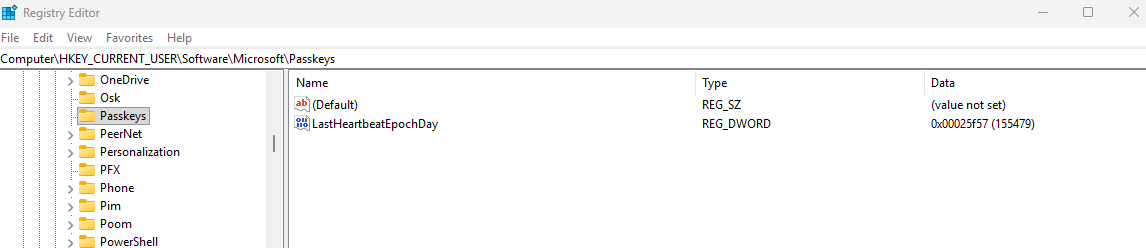
The table below covers every registry value relevant to passkey capability on Windows 11 24H2. The parent key for the first row is HKCU\Software\Microsoft\Passkeys.
| Value / check | Healthy state | If wrong or absent |
|---|---|---|
LocalToggleStatus (REG_DWORD)HKCU\Software\Microsoft\Passkeys | 1 (enabled) | 0 = user opted out; passkey creation on this device will silently fail for all apps. Absent key = platform default (users are opted in unless policy overrides). |
| Third-party provider State (REG_DWORD) HKLM\SOFTWARE\Microsoft\FIDO\<UserSID>\Plugins\{ProviderGUID} | 1 (active) | Missing key = third-party provider (e.g. 1Password, Bitwarden) not registered. ProviderGUID is dynamic per plugin. |
| Windows Hello provisioned Run: dsregcmd /status | NgcSet : YES | NgcSet : NO = user has not completed WHfB setup; passkeys cannot be created on this device until Hello is provisioned. |
Users create and manage their passkeys from Windows account settings and can sign in to a site either with the local Hello gesture or, for a site opened on another device, by using their phone as a companion authenticator over Bluetooth.
AllowPromptedProximalConnections in the Bluetooth Policy CSP, rather than blocking all Bluetooth outright, or cross-device passkeys will not work and users will not get a clear error message.The fix: govern passkeys with the 24H2 controls
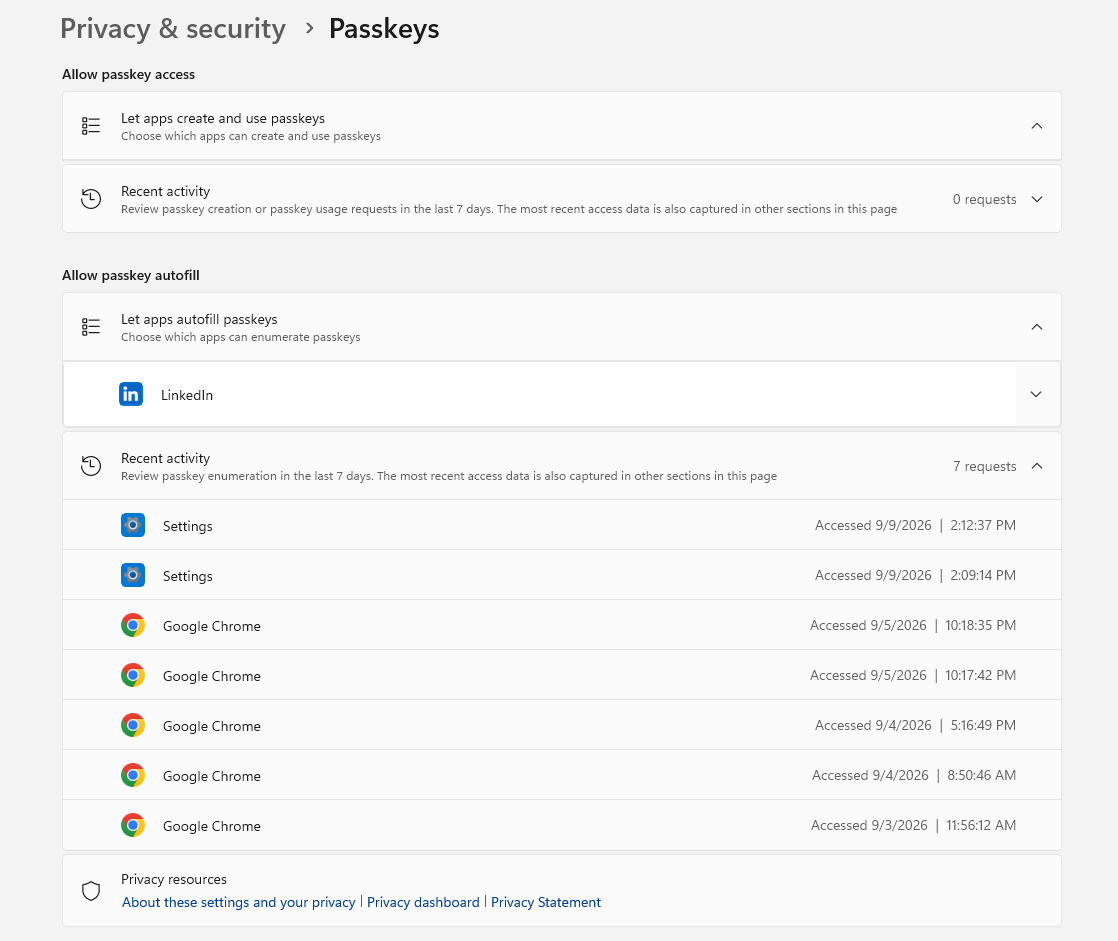
The big shift for IT is that Windows 11 24H2 added passkey privacy consent. Before an application can access passkeys, the user is prompted to allow or block it, and that access is managed per-application:
From that page a user (or, increasingly, policy) can allow or block individual applications from touching passkeys. If a user declines consent for an app, passkey registration and authentication simply do not work for that app until access is restored. This is the control that lets enterprises reason about which software can act as, or call, a passkey provider on a managed device.
Configure via Intune (PassportForWork CSP)
Windows Hello for Business and passkey-adjacent settings are governed via the PassportForWork CSP. The simplest path is the Settings Catalog, which exposes all WHfB controls without requiring you to hand-craft OMA-URI paths:
- Sign in to the Intune admin center at intune.microsoft.com.
- Go to Devices › Configuration › Create › New policy.
- Platform: Windows 10 and later. Profile type: Settings catalog. Select Create.
- In the Settings picker, search for “Windows Hello for Business” to see all controls. Enable the ones relevant to your passkey posture.
- For FIDO2 security key sign-in specifically, search for “Use Security Key For Sign In” and set it to Enabled.
- On the Assignments page, assign to your target device group and select Next › Create.
If you need to configure settings the Catalog does not yet expose, use a Custom OMA-URI profile. The key paths for the PassportForWork CSP are listed below. Replace {TenantId} with your actual Entra tenant GUID (find it at Entra admin center › Overview › Properties › Tenant ID).
| Setting | OMA-URI | Value (enabled) |
|---|---|---|
| Enable WHfB | ./Device/Vendor/MSFT/PassportForWork/{TenantId}/Policies/UsePassportForWork | True |
| Require TPM | ./Device/Vendor/MSFT/PassportForWork/{TenantId}/Policies/RequireSecurityDevice | True |
| Allow FIDO2 security keys for sign-in | ./Device/Vendor/MSFT/PassportForWork/{TenantId}/SecurityKey/UseSecurityKeyForSignin | 1 |
Get-MgOrganization | Select-Object Id in PowerShell with the Microsoft Graph module installed, or check Entra admin center › Overview › Properties › Tenant ID. It must be the GUID (xxxxxxxx-xxxx-xxxx-xxxx-xxxxxxxxxxxx), not the .onmicrosoft.com domain name.Configure via Group Policy
All WHfB Group Policy settings live under one path in the Administrative Templates. On any domain-joined device with the Windows ADMX templates loaded in your central store:
| Policy name | What it controls |
|---|---|
| Use Windows Hello for Business | Enables or disables WHfB provisioning — the prerequisite for Windows passkeys. Must be Enabled for users to create passkeys via Windows Hello. |
| Use a hardware security device | Requires a TPM chip for private key storage. Strongly recommended for enterprise passkey deployments — keys stored in TPM cannot be exported even if an attacker accesses the device. |
| Use certificate for on-premises authentication | Certificate-based auth for hybrid environments. Does not directly affect passkey functionality, but affects whether Entra hybrid join devices can authenticate without line-of-sight to a DC. |
HKCU\Software\Microsoft\Passkeys\LocalToggleStatus registry key or the Settings Policy CSP. Use Intune for this specific control — Group Policy only covers the WHfB provisioning settings documented above.Here is a real run of Get-WindowsPasskeyCapability.ps1 from this series, on a device fully capable of the 24H2 controls described above:
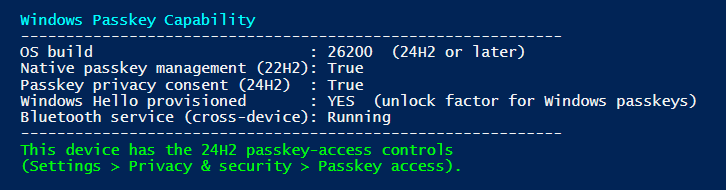
All four capability signals are green here — build, native management, privacy consent, and the Bluetooth service cross-device sign-in depends on. If your fleet is still mostly on 22H2/23H2, expect Passkey privacy consent (24H2) : False on most devices until the 24H2 rollout completes — that is the signal to hold off promising per-app consent controls to security until the OS is actually there.
Proof it worked: where this leaves WHfB and passkeys
WHfB is not going away — it remains the strong, TPM-backed way to sign in to Windows and Entra, and it is one of the three methods that satisfy phishing-resistant Conditional Access. What is changing is the scope: the same Hello gesture your users already trust now also unlocks passkeys for the entire web. The strategic posture for 2026 is not “WHfB or passkeys” — it is WHfB for platform sign-in, Windows Hello passkeys for web/app sign-in, and FIDO2 keys as the portable, high-assurance companion. One unlock, everywhere.
AllowPromptedProximalConnections, and decide device-bound versus synced deliberately — then let the credential your users already know carry them across the whole web.References
- Support for passkeys in Windows
- Enable and support passkeys in Microsoft Authenticator (Entra ID)
- PassportForWork CSP — WHfB and FIDO2 OMA-URI reference
- Bluetooth Policy CSP (AllowPromptedProximalConnections for cross-device passkeys)
- How Windows Hello for Business works
Microsoft MVP community deep-dives
| Author | Post | What it adds |
|---|---|---|
| Jan Bakker (MVP) | Windows 11 Advanced passkey settings | Documents the HKCU\Software\Microsoft\Passkeys\LocalToggleStatus registry key, third-party provider GUIDs, and what each value controls on 24H2 devices |
| Jan Bakker (MVP) | Why Windows is the hardest passkey surface in 2026 | Deep analysis of the 24H2 per-app consent model, AAGUID attestation decisions, and what enterprise Entra admins need to plan for before rollout |
| Nathan McNulty (MVP) | Improving passkey registration experiences | Uses Intune Compliance and App Protection Policies to make passkey registration smoother for end users at enterprise scale |
Script for this post is in Daily-Tasks. Download it directly — no sign-in required. It is read-only and makes no changes to your environment; validate in your own lab before running against production devices.