Every Windows 11 device in your estate is already writing a detailed account of its own life. Process creations, logons, service installs, scheduled task changes, PowerShell blocks. All of it lands in local event logs. Then it rolls over and disappears. Windows Event Forwarding, or WEF, is the mechanism Microsoft ships in the box to get a chosen slice of that off the device and onto a server before it is lost. No third-party agent. No licence. No installer.
Windows Event Forwarding pushes selected events from clients to a Windows Event Collector server over WinRM, using only in-box components, and it is the cheapest real telemetry a Windows estate can have. It also fails completely silently: Microsoft's own documentation says the user will never notice, even when it is broken. Three things cause almost all of those silent failures - the NETWORK SERVICE account cannot read the source channel, the subscription's XPath query selects from something that is not there, or the collector's WinRM endpoint is not actually reachable. This post explains the mechanism end to end, then shows you how to prove from a single client which of the three you have.
The problem: the evidence exists and then it is gone
Start with what a Windows event log actually is. It is a fixed-size circular file on disk. When it fills, the oldest events are overwritten. The Security log on a default Windows 11 install is 20 MB. On a busy machine with process-creation auditing switched on, that is hours, not weeks.
So when something goes wrong on a device, the window in which you can still see what happened is short. If you only look at the device after the ticket is raised, the answer has usually already been overwritten.
Windows Event Forwarding solves this without an agent. WEF is a feature of the Windows Event Log service itself. You tell a client where a collector lives. The client asks that collector what it wants. The collector answers with one or more subscriptions, each containing an XPath query. The client runs those queries against its own logs and ships the matches. Microsoft's own words: WEF "reads any operational or administrative event logged on a device in your organization and forwards the events you choose to a Windows Event Collector (WEC) server."
The receiving side is a Windows Event Collector, or WEC. That is just a Windows machine running the Windows Event Collector service. Forwarded events land in a local log called ForwardedEvents. From there you can read them in Event Viewer, or ship them onward to a Security Event Manager or a data lake.
Two subscription models, and you almost certainly want the first one. A source-initiated subscription is defined on the collector without naming any clients; clients are told by policy where the collector is, and they call in. A collector-initiated subscription names every client up front, and the collector reaches out to each one. Microsoft's guidance is explicit: "The simplest, most flexible IT deployment with the greatest scalability can be achieved by using a push, or source initiated, subscription." Collector-initiated is for closely watching a small, known set of machines.
Here is the part that costs people weeks. WEF has no user interface, no toast, no error dialog, and no health signal anywhere an administrator normally looks. Microsoft states it plainly in the WEF intrusion-detection guidance: asked whether the user will notice if WEF encounters an error, the answer given is "No." Everything - success, warning and failure - goes to one operational event channel that nobody opens.
The practical failure looks like this. You build a collector. You publish a Group Policy Object. You wait. The subscription's runtime status shows a handful of active sources instead of ten thousand. Nothing in the estate is alerting. Nobody can tell you which clients are missing or why.
Gotcha: a healthy collector proves nothing about a client. The collector only knows about clients that successfully called in. A client that cannot reach it, or that cannot read the log it was asked to read, is invisible to the collector by definition. Every diagnosis has to start on the client.
Why it happens: how a client actually learns it has a subscription
To find the three failure modes you need the chain. Here is what calls what, in order, on a source-initiated forwarder.
- Group Policy or Intune writes a value under the Event Forwarding policy key in the registry. The value is a string naming the collector, and optionally a refresh interval and an issuing certificate authority thumbprint.
- The Windows Event Log service (short name
EventLog) hosts the forwarding plugin. It reads that policy value. - The forwarding plugin connects outbound to the collector's WinRM endpoint at the
/wsman/SubscriptionManager/WECURL. WinRM is Windows Remote Management, Microsoft's implementation of the WS-Management protocol. It authenticates as the computer account, not as the signed-in user. - The collector answers with the list of subscriptions this machine is allowed to have, plus, for each one, the XPath query and a bookmark saying where this client got to last time.
- The forwarding plugin runs each query against the local channels. Critically, it does this in the security context of NETWORK SERVICE - because that is the account the service host runs under.
- Matching events are sent to the collector's
/SubscriptionsURL, either pushed as they occur or pulled in batches, depending on the subscription's delivery mode. - The Windows Event Collector service (
Wecsvc) on the collector writes them into ForwardedEvents, and records the client's bookmark and last heartbeat in the collector's registry.
Every one of the three silent failures is a break in that chain. Step 3 breaking is a reachability problem. Step 4 handing over a query that matches nothing is a query problem. Step 5 being denied read access is a permission problem. Nothing further up the chain notices.
Registry: the whole surface, client and collector
The client-side configuration lives entirely under one policy key. That is the same key whether you set it by Group Policy, by Intune, or by hand.
| Value or subkey | Type | What it does |
|---|---|---|
SubscriptionManager (subkey) | Key | Holds one REG_SZ value per collector, named 1, 2, 3 and so on. Microsoft documents this exact key path as the alternative to the Group Policy setting. |
SubscriptionManager\1 | REG_SZ | The collector address. Documented syntax: Server=https://<FQDN>:5986/wsman/SubscriptionManager/WEC,Refresh=<seconds>,IssuerCA=<thumbprint>. For plain HTTP use port 5985 and drop IssuerCA. |
MaxForwardingRate | REG_DWORD | Events per second cap set by the "Configure forwarder resource usage" policy. Microsoft documents the policy and the parent key; the value name itself is observed on a live device and is not published, so do not build detection logic on the name alone. |
On the collector, subscription state lives elsewhere. Microsoft's scalability guidance notes that "for each unique device that connects to a WEF subscription, there's a registry key (corresponding to the FQDN of the WEF Client) created to store bookmark and source heartbeat information." That matters at scale: past roughly 100,000 lifetime sources on one subscription, Microsoft warns the registry will not be readable and the collector will likely have to be rebuilt.
| Subkey | Side | What is in it |
|---|---|---|
Subscriptions | Collector | One key per subscription, and beneath it the per-source bookmark and heartbeat state described above. |
Globals | Collector | Retry and inactive-source behaviour. Observed value names include RetryCount, RetryInterval and InactiveESCleanupMaxMinute. Observed and undocumented - read them, do not set them. |
ConfigurationModes | Collector | The stored definitions behind Normal, MinLatency, MinBandwidth and Custom delivery modes. Observed and undocumented. |
System files and DLLs: what is actually executing
WEF is not one binary. It is the event log service, the WinRM service, and a set of libraries they load. Every path below was verified present on a Windows 11 Enterprise 24H2 device.
| Binary | Reported description | Role in the flow |
|---|---|---|
C:\Windows\System32\wevtsvc.dll | Event Logging Service | The service DLL behind the EventLog service. Owns the channels and hosts the forwarding plugin that reads the SubscriptionManager policy. |
C:\Windows\System32\WsmSvc.dll | WSMan Service | The service DLL behind WinRM. Carries every WS-Management message between forwarder and collector. |
C:\Windows\System32\wecsvc.dll | Event Collector Service | The service DLL behind Wecsvc. Collector side only - it accepts subscriptions and writes ForwardedEvents. |
C:\Windows\System32\wecapi.dll | Event Collector Configuration API | The API surface the Windows Event Collector functions expose. This is what Event Viewer and wecutil.exe call. |
C:\Windows\System32\wecutil.exe | Event Collector Command Line Utility | Creates, lists and inspects subscriptions on the collector. |
C:\Windows\System32\wevtapi.dll | Eventing Consumption and Configuration API | The Windows Event Log API. Everything that reads a channel, including Get-WinEvent, goes through it. |
C:\Windows\System32\wevtutil.exe | Windows Event Log Utility | Reads and sets channel configuration, including the channel access SDDL that decides whether NETWORK SERVICE can read a log. |
C:\Windows\System32\winrm.cmd | (script wrapper) | The winrm command line. Enumerates and configures listeners. |
Log files and channels
There is no text log. WEF logs to an event channel like everything else. The channel name and its file are worth committing to memory, because the display name in Event Viewer does not match the real name.
| Event ID | Meaning | Source of the meaning |
|---|---|---|
| 100 | "The subscription <sub_name> is created successfully." The client has been handed a subscription and accepted it. | Documented by Microsoft |
| 104 | "The forwarder has successfully connected to the subscription manager at address <FQDN>." This is the event that proves reachability. | Documented by Microsoft |
| 105 | "The forwarder is having a problem communicating with subscription manager at address ..." followed by an error code. This is failure mode three. | Documented by Microsoft |
| 106 | "Subscription policy has changed. Forwarder is adjusting its subscriptions according to the subscription manager(s) in the updated policy." Fires after a policy refresh. | Observed on a live device, message text quoted verbatim. Not published - treat as informational only. |
Gotcha: Microsoft does not publish a complete ID list for this channel. Community write-ups circulate tables of IDs 101, 102, 103, 107 and 111 with confident meanings. I could not confirm any of those from a Microsoft-official source, and I am not going to pretend otherwise. Read the message text of whatever ID you see rather than trusting a table. If you build automated detection, key it on 104 and 105 - those two are documented.
Services and scheduled tasks
| Short name | Display name | Expected state on a client |
|---|---|---|
EventLog | Windows Event Log | Running, Automatic. Hosts the forwarding plugin. If it is stopped, nothing works at all. |
WinRM | Windows Remote Management (WS-Management) | Running. Microsoft's minimum client configuration for WEF is explicit that you must "Start the WinRM service." |
Wecsvc | Windows Event Collector | Stopped and Manual is correct on a client. It is only needed on the collector, where wecutil qc sets it to delay-start and starts it. |
On scheduled tasks, be precise: there is no scheduled task under \Microsoft\Windows\... that drives event forwarding. Forwarding is driven by the EventLog service plus the Refresh= interval in the policy string. Microsoft's guidance describes that interval as controlling "how frequently the client connects to the /WEC URL to enumerate the available subscriptions."
There is one legitimate scheduled-task surface, and it is worth knowing because it solves a real problem. Some channels a good subscription wants are disabled by default, or are not readable by Event Log Readers. WEF cannot fix that itself - Microsoft is clear that "WEF is a passive system regarding the event log. It can't change the size of event log files, enable disabled event channels, change channel permissions, or adjust a security audit policy." Microsoft's recommended answer is to have the baseline GPO run a scheduled task that calls wevtutil.exe sl to enable the channel, set its size, and adjust its access.
How to verify: prove forwarding from the client, do not assume it
Everything below is read-only. Run it elevated on a client you believe should be forwarding.
Start with the policy. If this key is absent, the machine is not a forwarder and nothing else in this section matters. The command below reads the SubscriptionManager values and the rate cap in one shot.
Now confirm what the raw policy actually looks like in the registry. Do this in Registry Editor if you prefer clicking, because the value names are easy to misread.
Next, the two questions that actually separate the failure modes. Can this machine reach the collector's WinRM endpoint, and can NETWORK SERVICE read the channel the subscription wants? The block below answers both, then reads the plugin channel.
Group membership is the other half of the permission question, and it is the single most common cause of a silent WEF failure. Microsoft's minimum client configuration lists three steps, and the third is "Add the Network Service account to the built-in Event Log Readers security group."
Finally, look at the plugin channel in Event Viewer. Remember the display name differs from the real channel name.
On the collector, two commands close the loop. wecutil es lists every subscription; wecutil gr shows the runtime status, including which sources are active. Microsoft's own validation procedure is exactly this: run wecutil gr and "verify that the event source has connected."
Tip: check the client's clock against the refresh interval before you panic. A client does not re-read the collector immediately. It waits for the Refresh= interval. Microsoft's validation guidance says you "might need to wait until the refresh interval specified in the policy is over after you create the subscription for the event source to be connected." If you just published the GPO, run gpupdate /force on the client and then give it a refresh cycle before declaring it broken.
The fix: the three failure modes, in the order they bite
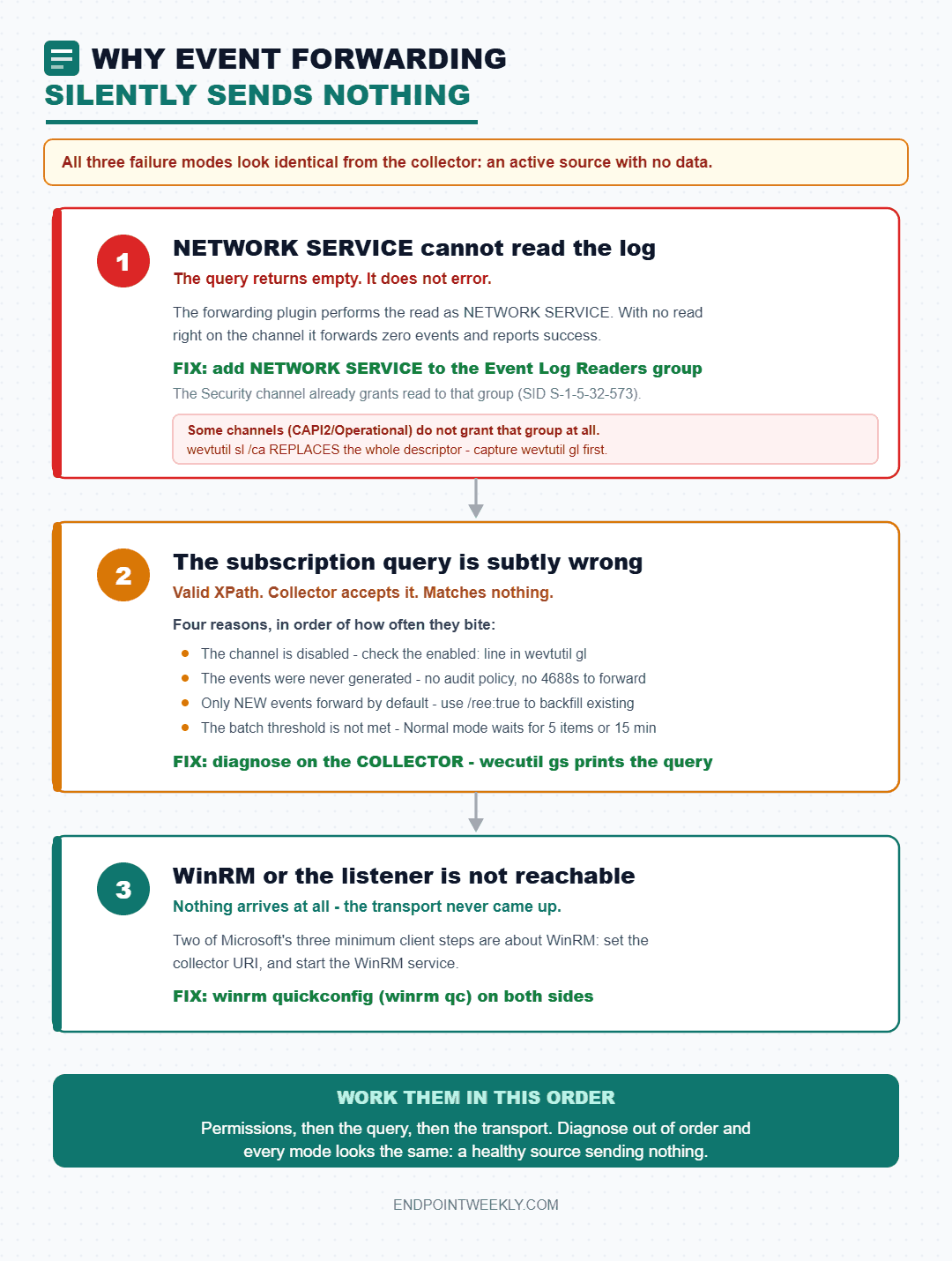
Mode one: NETWORK SERVICE cannot read the source log
This is the one that trips everyone, and it is entirely about which identity does the reading. The forwarding plugin lives in the Windows Event Log service, and on Windows 11 that service runs in a service host under a restricted account. When the plugin runs your XPath query, the read is performed as NETWORK SERVICE. If NETWORK SERVICE has no read right on the channel, the query returns nothing. It does not error. It returns an empty result, forwards zero events, and the collector shows a happy, active source with no data.
Microsoft's fix is one sentence, and it is worth quoting exactly: "To be able to forward the Security log you need to add the NETWORK SERVICE account to the EventLog Readers group."
The mechanism behind that sentence is the channel's own security descriptor. On a default Windows 11 device the Security channel's access string is O:BAG:SYD:(A;;0xf0005;;;SY)(A;;0x5;;;BA)(A;;0x1;;;S-1-5-32-573). That last access-control entry grants read to S-1-5-32-573, which is the built-in Event Log Readers group. Adding NETWORK SERVICE to that group is what makes the existing entry apply to it. That is the whole trick.
Some channels do not grant Event Log Readers at all, and for those, group membership alone is not enough. Microsoft calls this out for the certificate API channel specifically: channels "such as Microsoft-Windows-CAPI2/Operational must have the channel access modified to allow the Event Log Readers built-in security group to read from it." Microsoft's documented example, run as a scheduled task from the baseline GPO, is wevtutil.exe sl Microsoft-Windows-CAPI2/Operational /ca:"O:BAG:SYD:(A;;0x7;;;BA)(A;;0x2;;;AU)(A;;0x1;;;S-1-5-32-573)".
Destructive risk: wevtutil sl /ca replaces the entire security descriptor, it does not append to it. Whatever SDDL string you pass becomes the channel's complete access list. Get it wrong and you can lock the system, administrators, or your own monitoring out of a channel, and the only warning you get is that reads stop returning data. Always capture the current value with wevtutil gl <channel> first, keep it, and build your new string from it. Never apply an SDDL string copied from a blog - including this one - without reading it entry by entry against your own baseline.
Mode two: the subscription query is subtly wrong
The second failure mode is that the query is valid XPath, the collector accepts it, and it matches nothing. Four common reasons:
- The channel is disabled. Several useful channels ship disabled. A query against a disabled channel returns nothing. Check with
wevtutil gl <channel>and look at theenabled:line. - The events are not being generated at all. WEF only forwards what already exists. If Process Creation auditing is off, no amount of subscription tuning will produce 4688 events. Microsoft publishes a minimum recommended audit policy for exactly this reason.
- Existing events are being skipped. By default a subscription forwards only events generated after the client received it. Microsoft states that "By default, WEF subscriptions will only forward events generated after the WEF subscription was received by the client." Turn on read-existing-events, or
wecutil ss <name> /ree:true, when you want backfill. - Nothing has hit the batch threshold yet. Microsoft's own validation note is that "The DeliveryMaxItems number of events must be raised for the events to be forwarded." With the Normal delivery mode that is five items and a fifteen-minute batch timeout, so a quiet test machine can look dead when it is merely patient.
You cannot see the collector's query text from a client. That is a genuine limitation, and it is why mode two has to be diagnosed on the collector with wecutil gs <SubscriptionId>, which prints the query. What a client can tell you is whether the channels the query names are present, enabled and readable - which is enough to rule mode two in or out most of the time.
Mode three: WinRM or the listener is not actually reachable
Microsoft's minimum client configuration has three steps and two of them are about WinRM: configure the collector URI, and start the WinRM service. On both sides the documented setup command is winrm quickconfig, which can be shortened to winrm qc. Microsoft documents exactly what it does: it starts the WinRM service and sets it to auto-start, configures a listener on any IP address for HTTP or HTTPS, and opens the firewall ports. The default ports since WinRM 2.0 are 5985 for HTTP and 5986 for HTTPS.
Note one wrinkle Microsoft flags: winrm quickconfig "creates a firewall exception only for the current user profile." Change the firewall profile - a laptop moving from Domain to Public, for example - and the exception may not follow.
There is also a documented trap that looks exactly like a firewall problem and is not. On the collector, both the Windows Event Collector service and the WinRM service need permission on the reserved URLs http://+:5985/wsman/ and https://+:5986/wsman/. Historically one service host process ran both, so both had access. Microsoft's support article states that on Windows Server 2019, "If a Windows Server 2019 computer has more than 3.5 GB of RAM, separate svchost processes run WinRM and WecSvc," and as a result "event forwarding may not function correctly in the default configuration." The symptom on the client is event 105 with error code 2150859027. The check is netsh http show urlacl on the collector, and Microsoft publishes the exact netsh http add urlacl commands to repair it.
Context: the transport is encrypted even when the URL says HTTP. This surprises people, and it means you do not need HTTPS just for confidentiality inside a domain. Microsoft: "In a domain setting, the connection used to transmit WEF events is encrypted using Kerberos, by default." The HTTPS option exists for the case where Kerberos mutual authentication is not available and you need certificate-based authentication instead - typically non-domain sources.
Configuring the client with Group Policy
This is the original and still the most common route. It is a single computer-side setting.
- Open the Group Policy Management Console on a domain controller, or
gpedit.mscfor a local test, and create or edit a GPO linked to your client OU. - Navigate to Computer Configuration > Administrative Templates > Windows Components > Event Forwarding.
- Open Configure target Subscription Manager. Set it to Enabled.
- Click Show next to SubscriptionManagers.
- Add one row per collector, in the documented syntax:
Server=http://wec01.contoso.com:5985/wsman/SubscriptionManager/WEC,Refresh=900. For HTTPS use port 5986 and append,IssuerCA=<thumbprint>. - Optionally open Configure forwarder resource usage and set an events-per-second cap. Leave it alone unless you have a volume problem.
- In the same GPO, under Computer Configuration > Policies > Windows Settings > Security Settings > Restricted Groups, add NETWORK SERVICE to BUILTIN\Event Log Readers. Skipping this step is failure mode one.
- On a client, run
gpupdate /force, then confirm the registry values landed and watch for event 104 on the plugin channel.
Gotcha: a bare host name is accepted and silently degrades your control. On a live corporate device I found values of the form Server=wec01.contoso.com with no scheme, no port, and no /wsman/SubscriptionManager/WEC path. Windows accepts it and defaults to HTTP on 5985. But you have now delegated scheme and port to a default, your intent is not visible to the next administrator, and you cannot tell a typo from a policy decision. Always write the full documented form.
Configuring the client with Intune - and the honest limits
Here is the verified position, because this is where a lot of writing gets vague. The SubscriptionManager setting does exist in the Policy Configuration Service Provider, or Policy CSP. Microsoft documents it as ./Device/Vendor/MSFT/Policy/Config/ADMX_EventForwarding/SubscriptionManager, mapped to the Group Policy setting "Configure target Subscription Manager" in EventForwarding.admx, with a registry key name of Software\Policies\Microsoft\Windows\EventLog\EventForwarding. It applies to Windows 11 version 21H2 and later, and to Windows 10 2004 and later with KB5005101.
The catch is the shape of it. Microsoft labels the whole ADMX_EventForwarding area as ADMX-backed and states that it "contains ADMX-backed policies which require a special SyncML format to enable or disable. You must specify the data type in the SyncML as <Format>chr</Format>." In Intune terms, that means a Custom device configuration profile carrying an OMA-URI with an XML-encoded ADMX payload. There is no friendly toggle. The companion policy, ForwarderResourceUsage, has the same shape.
- Sign in to the Microsoft Intune admin center and go to Devices, then Configuration.
- Choose Create, then New policy. Platform: Windows 10 and later. Profile type: Templates, then Custom.
- Give the profile a name such as WEF - target subscription manager.
- On the Configuration settings page choose Add.
- Set OMA-URI to
./Device/Vendor/MSFT/Policy/Config/ADMX_EventForwarding/SubscriptionManager. - Set Data type to String.
- For Value, supply the XML-encoded ADMX enable payload containing your SubscriptionManagers list element. Microsoft's "Understanding ADMX-backed policies" page carries the enabling example to model it on.
- Assign the profile to your device group. Assign to devices, not users - this is a device-scoped policy.
- On a target client, run the readiness script at the end of this post and confirm the registry value arrived and that event 104 follows.
Intune can configure the forwarder. It cannot build you a collector. Do not plan a WEF rollout as an Intune-only project. The collector is a Windows Server with the Windows Event Collector service configured by wecutil qc, subscriptions created by wecutil cs from an XML file or by Event Viewer, and per-subscription access control lists naming which machine accounts may participate. None of that has a CSP, a Settings Catalog entry, or a Graph API. It is server-side work, and if your estate has no server to host it, WEF is not the answer for you.
Proof it worked: a real run on a real forwarder
The companion script for this post is Get-WefClientReadiness.ps1. It runs on a client, reads everything described above, and prints a verdict mapped to the three failure modes. It is read-only: it never creates a subscription, never starts or stops a service, and never touches an access control list. If any read fails it says so and exits non-zero, so that a failed read is never mistaken for a healthy machine.
The output below is a genuine run on a domain-joined Windows 11 Enterprise device that has a real WEF policy applied. Host names and the machine name are replaced; nothing else is edited.
Read that verdict as a work order. Two of the three failure modes are present on one device. The permission problem is a one-line group change deployed by policy. The reachability problem is a name that does not resolve, which is a DNS or a decommissioned-server conversation, not an event forwarding conversation. Neither would have been visible from the collector, because this client never reached it.
The healthy end state looks different in exactly two places. The plugin channel shows a 104 followed by a 100, and the collector's runtime status counts this machine as active. Confirm the second half on the collector.
One honest note on sourcing. I looked for a community deep-dive on WEF from the usual endpoint-management authors to add alongside the Microsoft references. I could not verify one that was genuinely on this topic, so there is no community table below. An omitted table is better than a citation I did not read.
References
- Windows Event Collector - the architecture, and the definition of both subscription models.
- Setting up a Source Initiated Subscription - the GPO path,
winrm qc -q,wecutil qc /q, the subscription XML, events 100 and 104, and the Security-log Event Log Readers requirement. - Use Windows Event Forwarding to help with intrusion detection - the minimum client configuration, channel access methods, delivery modes, collector scaling limits, and the statement that users never notice a WEF failure.
- ADMX_EventForwarding Policy CSP - the OMA-URI, the ADMX mapping, the registry key name, and the SyncML
chrrequirement. - Event collector doesn't forward events - event 105, error 2150859027, the reserved URL ACLs, and the split-svchost cause.
- Best practice of configuring EventLog forwarding performance - the SubscriptionManager registry subkey, and what
Refresh=, DeliveryMaxLatency and HeartbeatInterval each control. - wecutil -
es,gs,gr,ss,cs,qcand every option. - wevtutil -
el,gl,sland the/cachannel access option. - Installation and configuration for Windows Remote Management - what
winrm quickconfigdoes, the 5985 and 5986 defaults, and the per-profile firewall caveat. - Test-WSMan - the read-only reachability probe used above.
The companion script lives at Imran76Awan/Windows-11-Scripts, under windows-event-forwarding-collector-setup. It is read-only by design. Run it on a client that should be forwarding and it will tell you which of the three failure modes you have, or tell you loudly that it could not find out.
Download it from Imran76Awan/Windows-11-Scripts — no sign-in required. It is read-only: it reports and never changes a device or anything in Intune. Validate it in your own environment before relying on the output.