Every post in this series so far has pulled one thread. This one is the map. It exists because of a pattern that shows up in almost every escalated patching ticket I have ever picked up second: by the time the ticket reaches someone who knows how to read the logs, the logs are gone.
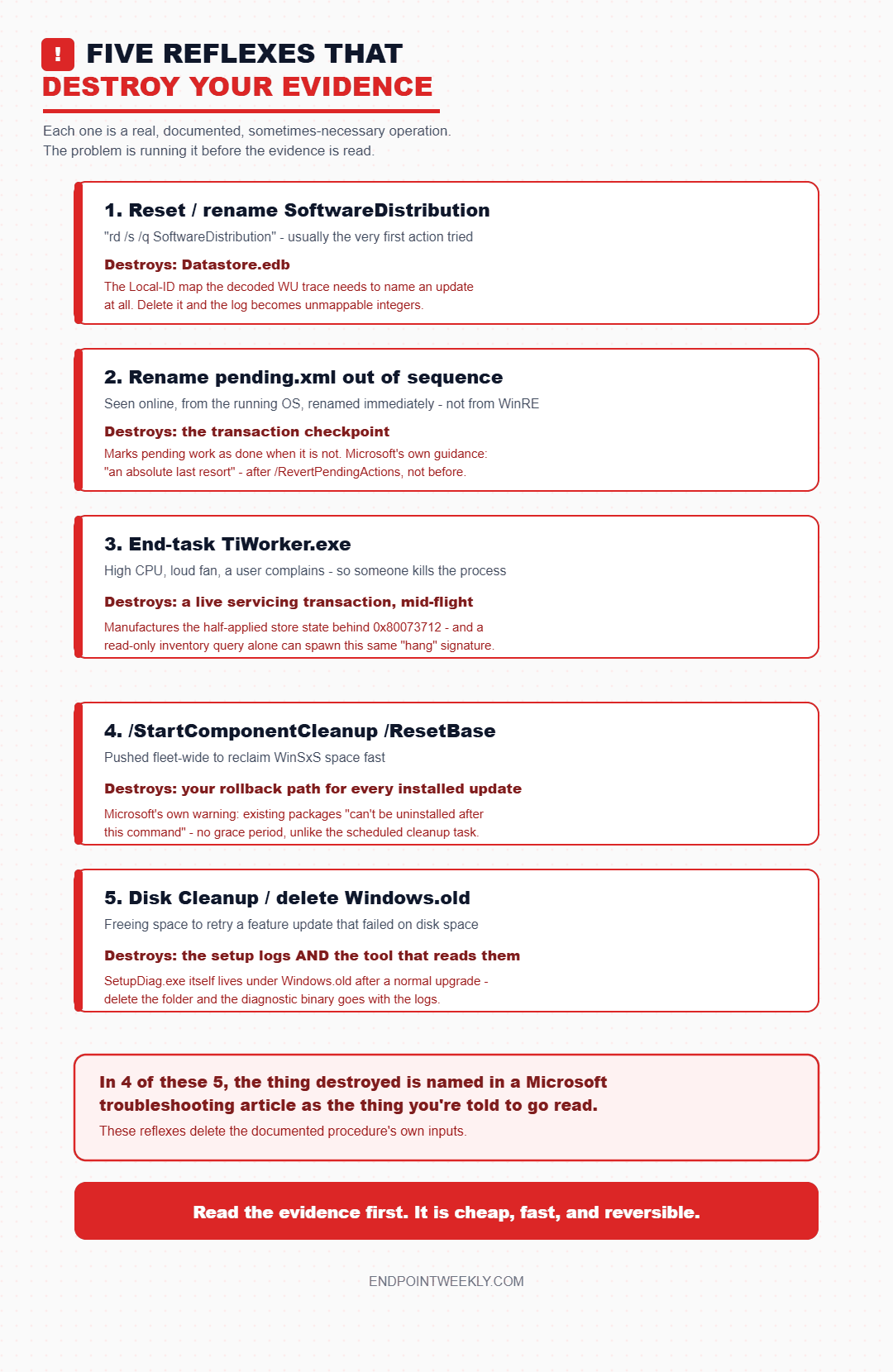
Not corrupted. Not rotated. Deleted — deliberately, by a competent engineer, in the first ninety seconds, as part of a fix. Somebody reset SoftwareDistribution. Somebody end-tasked TiWorker. Somebody ran Disk Cleanup to free space for the retry. Each of those actions is a documented, supported operation. Each of them also destroys the specific artefact that would have told you why the update failed, and in three of the five cases it destroys something Microsoft's own troubleshooting guidance later tells you to go read.
Watch on YouTube · Subscribe at @EndpointWeekly
So this closer does two things. First, a routing table: for each common symptom, the one place to look first, and why the obvious place is the wrong one. Second, an explicit catalogue of the five reflexes that burn the evidence, with the documented cost of each. Every device number here came off one corporate Windows 11 Enterprise machine, 25H2, build 26200.9168, servicing stack 10.0.26100.9156, read only, on 22 and 23 August 2026.
"Windows Update failed" is not one failure. It is seven independent subsystems — policy, scan, transfer, staging, boot-time commit, feature-update setup, and reporting — each with its own evidence store, and each destroyed by a different reflex. Route the symptom before you route the fix: stuck at 0% is a BITS question, not a Windows Update question; stuck at 100% every boot is pending.xml; a network-flavoured scan failure is WinHTTP, not the browser proxy; 0x800f08xx is CBS.log and ResolveSource(); a feature-update failure is setuperr.log then SetupDiag. Then know the five reflexes that cost you the answer: resetting SoftwareDistribution deletes the Datastore.edb that Microsoft's own log-reading article says you need to resolve Local IDs; renaming pending.xml out of sequence abandons a half-applied transaction; end-tasking TiWorker kills a live servicing transaction, and on this device a single read-only cmdlet was enough to make TiWorker look "stuck"; /ResetBase removes every superseded component and, per Microsoft, "all existing update packages can't be uninstalled after this command is completed"; and deleting Windows.old removes SetupDiag.exe along with the logs it reads. And one bug class lies to you by design, measured four separate times on this device: on Windows policy hives, key existence carries almost no information. A Get-ItemProperty test for CBS RebootPending can never return true because it is a subkey; a Test-Path on ...\WindowsUpdate\AU returns true on a device with zero legacy policy values. Test for the specific value, and report ValueCount.
The problem: the first command you run decides whether root cause survives
There is a deep asymmetry in patching troubleshooting that almost nobody states out loud. Reading evidence is cheap, fast, and reversible. Destroying evidence is also cheap and fast — and completely irreversible.
A Get-BitsTransfer, a netsh winhttp show proxy, a Get-WindowsPackage, a findstr over CBS.log: seconds each, zero risk, and they leave the failure exactly as it was so you can look again after your first theory turns out to be wrong. A rd /s /q %systemroot%\SoftwareDistribution takes about the same time and there is no undo. The download cache, the datastore, the WUA session history and the update-agent's local ID mapping are simply gone, and if the update fails again for the same underlying reason, you get to diagnose it from scratch with less information than you started with.
That asymmetry means the order of operations matters more than the fix. And the order most teams use is inverted, because the reflex fixes are the ones that are easy to remember, easy to script, and easy to justify in a ticket note.
SoftwareDistribution\DataStore, SoftwareDistribution\Download and catroot2. Microsoft puts a conditional in front of it. Most remediation scripts do not.Here is what a proper first pass looks like on a real device. Every line below is read-only, and the values are real, from the lab machine on 23 August 2026. This is the snapshot to take before you form a theory, because it is the one that tells you which of the seven subsystems you are even in.
Four commands. Nothing changed, nothing restarted, nothing cleared. And already you know the installed release, whether the servicing stack is mid-transaction, whether the system-level proxy is even in play, and which services are alive. That is enough to pick a branch. The rest of this post is the branch table.
Why it happens: one label, seven subsystems, seven evidence stores
The reason a single symptom routes to seven different places is that "Windows Update" is a label for a pipeline, not a component. Each stage in that pipeline is a separate service, writing to a separate store, using separate binaries, and failing with a separate error family.
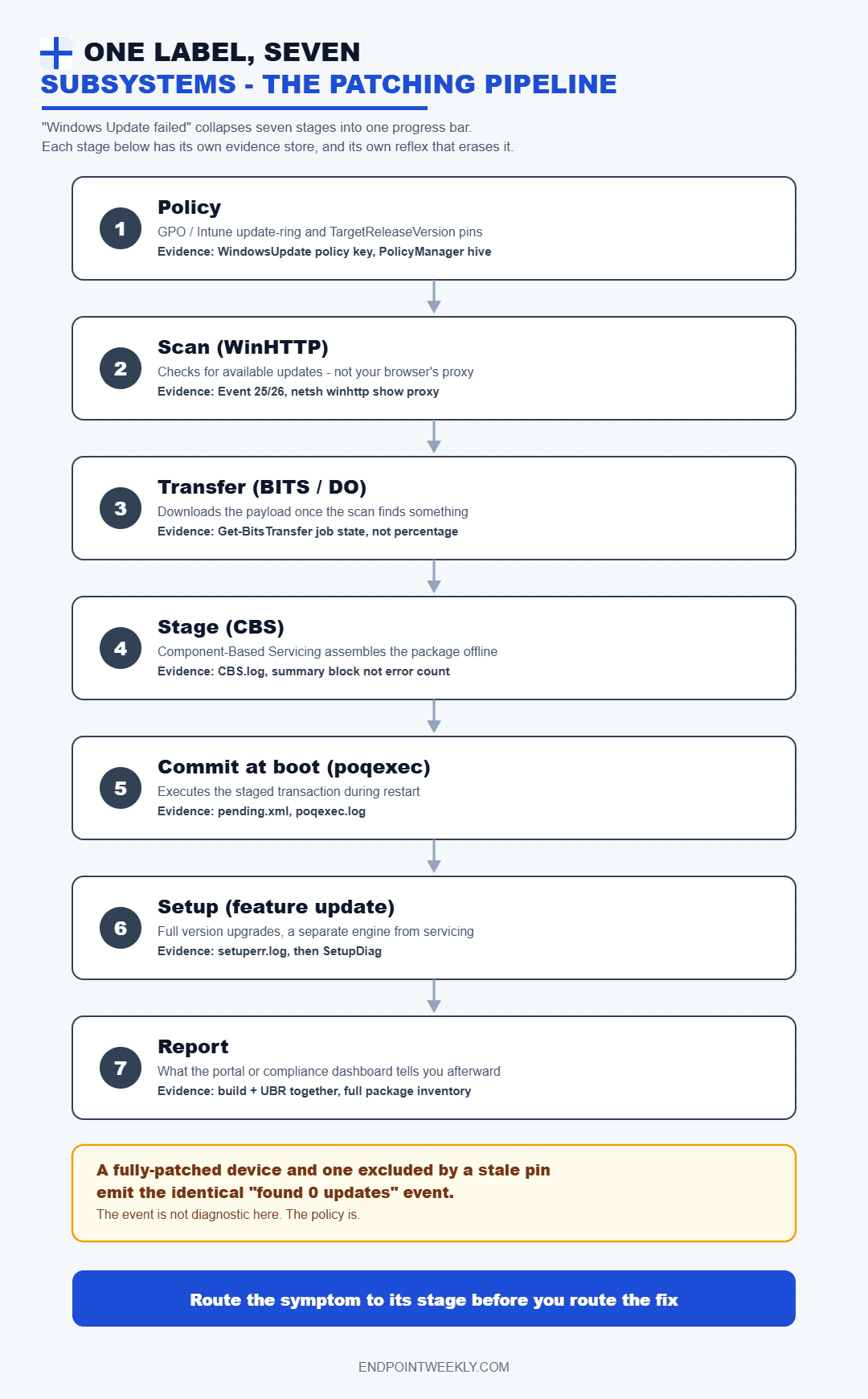
The user-visible symptom tells you very little about which stage broke, because the Settings UI collapses all seven into one progress bar. "Stuck at 0%" and "install failed with 0x800f0831" look like the same class of problem in the UI. They are not even in the same subsystem, do not share a log, and have no fix in common.
Worse, the binaries are not where most people assume. This matters because it determines where you attach a debugger, what you check version-wise, and whether a "servicing stack" claim in a log is about the OS build or something versioned independently.
The measured facts above are the reason the routing table works. Here they are as a reference, because when a log says "TiWorker" and you go looking in C:\Windows\servicing, you conclude the file is missing and start chasing a corruption theory that does not exist.
| Binary | Role | Where it actually lives (measured) |
|---|---|---|
wuaueng.dll | The Windows Update Agent engine. ServiceDll for wuauserv, which runs as svchost.exe -k netsvcs -p under LocalSystem. | C:\Windows\System32. Version 1509.2607.1012.0 — independent of the OS build. |
TrustedInstaller.exe | The servicing host. FileDescription reads "Windows Modules Installer" — the service display name. | C:\Windows\servicing, alongside CbsApi.dll, CbsMsg.dll, wrpintapi.dll. |
TiWorker.exe | The worker process. FileDescription reads "Windows Modules Installer Worker" — the name you see in Task Manager. | Not C:\Windows\servicing. The versioned WinSxS servicing-stack component directory. |
cbscore.dll | The CBS core the servicing stack loads. Its version is the servicing-stack version. | Not System32. The versioned WinSxS servicing-stack directory. Observed: stack 10.0.26100.9156 on OS build 26200. |
poqexec.exe | Executes the primitive operations queue at boot. FileDescription: "Primitive Operations Queue Executor". | C:\Windows\System32. Writes C:\Windows\Logs\CBS\poqexec.log. |
MoUsoCoreWorker.exe | Update Session Orchestrator worker — drives the download/install/reboot sequence. | C:\Windows\UUS\amd64. Not System32. |
How to verify: the routing table, the decision path, and the empty-key trap
(A) The symptom-to-evidence routing table
This is the core of the post. One row per symptom, and in every case the "first place to look" is deliberately not the place the symptom's name points at.
| Symptom | Look here FIRST | Why there, and not the obvious place |
|---|---|---|
| Stuck at 0% — download never starts or never moves | The BITS transfer queue: Get-BitsTransfer -AllUsers, or bitsadmin /list /allusers /verbose. Read the job state, not the percentage. |
Windows Update did not fail; it handed the transfer off and is waiting. Microsoft documents BITS (or Delivery Optimization) as the downloader. A job sitting in TRANSIENT_ERROR is retrying on a documented retry delay and is not stuck at all; a job in SUSPENDED or ERROR is a different problem entirely. The WU log will tell you a download was requested and nothing more. Microsoft's own mitigation for 0x80072EFE (WININET_E_CONNECTION_ABORTED) is exactly this: "At a command prompt, run: BITSADMIN /LIST /ALLUSERS /VERBOSE". |
| Stuck at 100%, or installs the same update at every boot | C:\Windows\WinSxS\pending.xml plus PendingXmlIdentifier in the COMPONENTS hive; then C:\Windows\Logs\CBS\poqexec.log. |
This is not a download or scan problem. The staging phase succeeded and the boot-time commit did not. pending.xml is the transaction; poqexec.exe executes it. But read poqexec.log carefully — it records queue creation and validation in the online session, so its presence is not proof a queue executed at boot. Measured: 21 poqexec.log entries across two days on a device with no pending reboot at all. |
Scan fails with something network-shaped (0x8024402C, 0x8024401C, 0x8024401B) |
netsh winhttp show proxy — and separately, the system clock and time zone. |
0x8024402C is WU_E_PT_WINHTTP_NAME_NOT_RESOLVED, documented as "the proxy server or target server name can't be resolved". That is a WinHTTP name-resolution failure, not a browser problem. For 0x8024401B Microsoft is explicit: "Either the Winhttp proxy or WinInet proxy settings aren't configured correctly… The Windows Update Agent uses WinHTTP to scan for available updates." And check the clock, because a skewed clock produces 0x800B0101, CERT_E_EXPIRED — "A required certificate is not within its validity period when verifying against the current system clock" — which reads like a content problem and is a time problem. |
Install fails with 0x800f08xx (0x800F081F, 0x800f0831, 0x800f0825) |
%WinDir%\Logs\CBS\CBS.log, searching for ResolveSource and for the literal , error. |
The 0x800f facility is CBS. Microsoft's own common-errors table spells the greppable string into the message field for 0x800f081f: "CBS_E_SOURCE_MISSING; source for package or file not found, ResolveSource() unsuccessful". And the documented search technique, from the 0x80070005 mitigation, is "open the last CBS.log, search for , error, and match with the timestamp". Do not reach for certutil -error here — measured, it decodes 0x80073712 but returns nothing useful for the 0x800f08xx family. |
Install fails with 0x80073712 |
The component store manifests — %SYSTEMROOT%\WinSxS\Manifests and %SYSTEMROOT%\Servicing\Packages — plus the Corrupt and AutoRepairNeeded values under the Component Based Servicing key. |
0x80073712 is ERROR_SXS_COMPONENT_STORE_CORRUPT, "The component store is in an inconsistent state". Microsoft documents exactly what DISM checks for integrity: files in Servicing\Packages and WinSxS\Manifests, and registry data under HKLM\COMPONENTS, HKLM\Schema and the CBS key. Read the CBS summary block for the discriminator that matters: CSI Payload Corruption separates a bad file from a bad manifest. Measured on the lab device: Corrupt = 0, AutoRepairNeeded = 0, LifetimeTimesSuccessfullyRepaired = 5, last corruption detected 2026-03-07 — the store has repaired itself five times and is currently clean. |
Feature update fails (0xC1900101 and friends) |
setuperr.log first, then SetupDiag. Not setupact.log. |
setupact.log is the biggest and, per Microsoft, "the most important log for diagnosing setup issues" — but it is enormous and mostly Info lines. setuperr.log is documented as containing "information about setup errors during the installation" and lives in the same folder, so it is the same evidence pre-filtered to the lines you want. Then run SetupDiag over the whole folder, and heed the documented caveat: "When SetupDiag indicates that there were multiple failures, the last failure in the log file is typically the fatal error, not the first one." Search direction matters: the doc tells you to find the last occurrence of the result code, not the first. |
| "You're up to date" but the device demonstrably is not | Three registry locations in this order: TargetReleaseVersion / TargetReleaseVersionInfo, the deferral values, then the MDM-applied hive at HKLM\SOFTWARE\Microsoft\PolicyManager\current\device\Update. |
An excluded device and a fully-patched device emit the identical event. Measured: Event 26 reading "found 0 updates" is produced both by a device with nothing to install and by a device filtered out by a stale pin. The event is not diagnostic; the policy is. Check all three because a GPO pin and an Intune ring can disagree, and Microsoft's Intune troubleshooting guide points at both the PolicyManager path and ...\Policies\Microsoft\Windows\WindowsUpdate. |
| The portal says compliant, the device disagrees | Build and UBR together, then the full package inventory via Get-WindowsPackage -Online. Trust these over any report. |
Two independent traps. First, Get-HotFix / Win32_QuickFixEngineering returns only Component Based Servicing updates — measured, it returned 4 entries on a device whose real package inventory showed 199 Superseded, 121 Installed, 95 Staged. Second, the UBR trap: KB5121003 is build 26200.9168 on 25H2 and 26100.9168 on 24H2. Same UBR, different build. A compliance check of "UBR -ge 9168" without also pinning CurrentBuild passes a 24H2 device against a 25H2 baseline. |
(B) The decision path, as numbered steps
Follow these in order. Each step is read-only and each one either lands you on a branch or eliminates one.
Step 1 — establish what is installed. DisplayVersion, CurrentBuild and UBR from HKLM\SOFTWARE\Microsoft\Windows NT\CurrentVersion. Never ProductName (it says "Windows 10 Enterprise" on this Windows 11 device) and never ReleaseId (frozen at 2009). If build and UBR already meet your baseline, the problem is the report, not the device — go to Step 8.
Step 2 — is the servicing stack mid-transaction? Test for C:\Windows\WinSxS\pending.xml. If it exists, stop. You are in the boot-time commit branch and nothing else you find matters until that transaction is resolved. This is also the point at which the temptation to rename the file appears; do not, and see reflex 2.
Step 3 — which stage reported the failure? Read Microsoft-Windows-WindowsUpdateClient/Operational for scan/download events and the Setup log for staging/install events. The channel identifies the subsystem before the error code does.
Step 4 — decode the error family, not the error. 0x8024xxxx is the update agent (scan, protocol, download manager, datastore). 0x800fxxxx is CBS. 0x8007xxxx is a Win32 error surfaced by whichever layer hit it. 0xC1900xxx is Windows Setup. That single character routes you faster than any error-code lookup.
Step 5 — open the one log the family points to. CBS family goes to CBS.log; setup family goes to setuperr.log; scan family goes to the decoded WU trace; download goes to the BITS queue. Resist opening all four.
Step 6 — if it is a scan failure, test the plumbing in the right order. System clock, then netsh winhttp show proxy, then name resolution of the configured update source, then policy. Not Internet Options.
Step 7 — if it is a CBS failure, read the summary block, not the error count. The counts that matter are CSI Payload Corruption and Total Detected Corruption, not how many lines contain the word Error. See the amber gotcha below for why.
Step 8 — if everything on the device is healthy, the defect is in reporting or policy. Compare build+UBR and the package inventory against the baseline, then check the pin, the deferrals and the PolicyManager hive. Fix the query, not the device.
0x800f0983 from parallelhydrator.cpp, and every one of them was self-tagged [Warning,...] inside the bracket. Same story for sessions: 183 sessions initialized against only 42 finalized, on a healthy machine. Unfinalized sessions and error lines are normal servicing noise. Only the summary block and the operation result are verdicts.Two more measurements from the same device make the point beyond CBS.log, because "an error count is not a verdict" generalises further than most people expect. First, C:\Windows\System32\catroot2\dberr.txt held 47 error lines against 38 success lines — on a machine where every August 2026 update installed correctly. The errors were shutdown-race noise: 0x426 (ERROR_SERVICE_NOT_ACTIVE) sixteen times and 0x45b (ERROR_SHUTDOWN_IN_PROGRESS) fourteen times. More errors than successes, and nothing wrong.
Second, and more surprising: 14 of the 73 certificates in the machine's root store were already expired, including Microsoft Code Signing PCA 2011, which expired on 8 July 2026. Updates install fine anyway, and the reason is documented rather than lucky. Microsoft's Authenticode time-stamping guidance states that "Time stamping allows Authenticode signatures to be verifiable even after the certificates used for signature have expired", because the countersignature lets a verifier establish that the signature was valid at the time it was affixed. An expired-certificate alarm from a scanner is therefore not a patching finding, and chasing it wastes the hour you needed for the actual failure.
One more routing shortcut, and it is a strange one: the decoder's silence tells you which subsystem raised the code. Measured on this device, certutil -error cleanly resolves the 0x800B (trust), 0x8009 (crypto), plain Win32 and WinHTTP facilities — and for anything in 0x8024xxxx, the Windows Update facility, it simply echoes the number back at you. So if certutil -error gives you a name, you are in a trust, crypto or transport problem. If it hands the number back unchanged, you are in the update agent and you need the decoded WU trace instead. It also returns nothing useful for the 0x800f08xx CBS family, which is why the CBS row above sends you to the log rather than to a decoder.
(C) The empty-key trap: one bug class, four measured instances
This deserves promoting to a named pattern, because it is the strongest through-line in the whole series and it has now been measured four separate times on the same device. The pattern is this: on Windows policy and servicing hives, the existence of a key carries almost no information. Keys get created by the OS whether or not anybody configured anything, and the thing you actually care about is a value inside — or, in one case, a subkey rather than a value.
These checks do not fail loudly. They return a confident boolean, the boolean is wrong, and nothing in the output hints at it. All four below are measured read-only on the lab device.
| The check | What it returns | What is actually there | Correct form |
|---|---|---|---|
Get-ItemProperty on ...\Component Based Servicing for RebootPending (and PackagesPending) |
False, always. On every device, pending or not, forever. | Both are subkeys, not values, so a property lookup can never find them. Microsoft's own published CheckForPendingReboot.ps1 settles it: it opens the CBS key and enumerates GetSubKeyNames(), then tests whether the result -contains "RebootPending". |
Enumerate subkeys, or Test-Path the child key. Never Get-ItemProperty. |
Test-Path on ...\Policies\Microsoft\Windows\WindowsUpdate\AU |
True — read as "legacy Automatic Updates policy is configured". | The key exists and is empty: ValueCount = 0, SubKeyCount = 0. Verified three times. The device is cleanly WUfB-managed with no legacy AU policy at all. |
Test for UseWUServer, NoAutoUpdate, AUOptions specifically, and report ValueCount. |
Test-Path on ...\CurrentVersion\Policies\Servicing |
True — read as "a repair source is configured". | The key exists but holds only CountryCode = GB. There is no LocalSourcePath, which is the one element the in-box Servicing.admx actually declares. No repair source is configured. |
Test for LocalSourcePath by name. |
Test-Path on ...\Policies\Microsoft\SystemCertificates\AuthRoot |
True — read as "root auto-update policy is configured". | ValueCount = 0, SubKeyCount = 3 (Certificates, CRLs, CTLs) — all created regardless of policy. DisableRootAutoUpdate is absent entirely, so root auto-update is at its default, not disabled. |
Test for DisableRootAutoUpdate by name and treat "absent" as "default", not "unknown". |
Four instances, four different hives, one bug. Worth grepping your own remediation library for tonight: a Get-ItemProperty reboot check will happily report "no reboot pending" across a fleet of machines that all need one, and a Test-Path-only policy check will report configuration that does not exist. The rule that covers all four: test for the value you care about, and if you must report on a key, report ValueCount and SubKeyCount alongside the boolean so the next person can see what you actually found.
Two of the four are worth seeing in raw form, because the output is so unremarkable that it is easy to read past.
Note what the second half of that block buys you. The same three commands that expose the empty AU key also hand you the pin state — and the pin on this device says 24H2 while the device runs 25H2. A Test-Path-only check would have sent you looking for a WSUS server that does not exist, and you would have walked straight past the overtaken pin sitting two lines below.
The policy keys themselves are worth tabulating, because the "already up to date" branch lives here and it is the branch most often misdiagnosed as a client fault.
WindowsUpdate.admx; MDM-applied equivalents land under HKLM\SOFTWARE\Microsoft\PolicyManager\current\device\Update instead, which is why you must check both.| Value | Meaning | What to look for |
|---|---|---|
TargetReleaseVersion | Switch that turns the feature-update pin on. Documented Group Policy name: "Select the target Feature Update version". | 1 means a pin is active. If this is 1 and the device reports "up to date", suspect exclusion before you suspect the client. Measured here: 1. |
TargetReleaseVersionInfo | The release the device is pinned to, as a version string. | Compare it against the installed DisplayVersion. Measured here: 24H2 while the device runs 25H2. A pin behind the install is a stale pin, and Microsoft's policy documentation does not describe what happens in that state — so do not assume it will pull the device back. Intune's own documentation is blunt about the general case: "Feature update policies don't downgrade devices." |
DeferFeatureUpdatesPeriodInDays | Documented deferral of up to 365 days for the General Availability Channel. | A long deferral looks exactly like a broken client. Read it before you touch the client. A separate pause mechanism holds for 35 days from the specified start date. |
DeferQualityUpdatesPeriodInDays | Documented deferral of up to 30 days for quality updates; Microsoft recommends configuring it to less than 3 days. | Quality updates keep flowing while feature updates are paused, so an LCU arriving on a device stuck on an old release is normal, not contradictory. |
UseWUServer / WUServer / NoAutoUpdate / AUOptions | The legacy Automatic Updates values, under the AU subkey. | Test for these values, never for the presence of the AU key. Measured: the key exists with zero values. Also check DisableDualScan if UpdateServiceUrl is populated. |
The event log is the other routing surface, and it is faster than any registry read because the channel itself names the subsystem.
Microsoft-Windows-Servicing provider, so the Setup-log IDs here come from the on-device provider manifest and from real observed entries — treat them as measured, not documented.| Event ID | Message | What it tells you |
|---|---|---|
| 25 | "Windows Update failed to check for updates with error <hex>." (Error) | The scan failed. Route on the hex, then go to WinHTTP and the clock. Caution: 0x80240438 appeared 11 times in real Event 25 entries on this device and is not in Microsoft's published error list — do not assert a meaning for it. |
| 26 | "Windows Update successfully found N updates." (Information) | The scan completed. With N=0 this is not diagnostic: a fully-patched device and a device excluded by a stale pin emit the identical line. Go read the policy. |
| 31 | "Windows Update failed to download an update." (Error) | Hand-off to the transfer layer failed or the transfer itself did. Go to the BITS queue, not to CBS. |
| 41 | "An update was downloaded." (Information) | The payload is on disk. Any failure after this point is a staging or commit problem, which moves you out of the network branch entirely. |
| 2 (Setup log) | "Package <KB> was successfully changed to the Staged state" | CBS staged the package. Observed for the real KBs on this device. Staged is not Installed — the measured inventory showed 95 packages sitting in Staged. |
| 4 (Setup log) | "A reboot is necessary before package <KB> can be changed to the Installed state" | The install is genuinely waiting on a restart. Observed for KB5120708, timestamped 18:37:47 — the same second CBS.log logged "Reboot required: yes". That correlation is how you prove the two logs describe one event. |
| 1013 / 1014 (Setup log) | Corruption detection start / complete, provider Microsoft-Windows-Servicing | A detect/complete pair. The field Detection Only: 1 distinguishes a /ScanHealth from a /RestoreHealth — useful when you need to know whether someone already attempted a repair. |
The fix: five evidence-destroying reflexes and what each one costs
Every one of these five is a real, documented, sometimes necessary operation. The problem is never the operation. The problem is running it before the evidence has been read, when the operation itself is what deletes the evidence.
Reflex 1 — resetting or renaming SoftwareDistribution
- What people do
net stop wuauserv, thenrd /s /q %systemroot%\SoftwareDistribution, or renameDataStoreandDownloadto.bak. Usually the very first action, often wrapped in a remediation script.- What Microsoft documents
- Both forms are published. The blunt one appears under the heading "How do I reset Windows Update components?" prefixed with "If all else fails". The surgical one is step 4 of the manual reset procedure, and it carries its own gate: "If it is your first attempt at resolving your Windows Update issues by using the steps in this article, go to step 5 without carrying out the steps in step 4."
- What it costs
Datastore.edb. And Microsoft's own log-reading article makes that specific: the decoded WU trace refers to updates by Local ID, and "You can find the local IDs that a client is using by getting the client's%WINDIR%\SoftwareDistribution\Datastore\Datastore.edbfile." Delete the datastore and the decoded log becomes a stream of integers you cannot map to updates. The WUA session history goes with it, so you also lose the record of what was attempted, when, and with what result.- What to do instead
- Decode and read the trace first, while the datastore still exists. Then, if you still need the reset, rename rather than delete, and keep the
.bakfolders until the case is closed. One caution from measurement:Get-WindowsUpdateLog -ForceFlushstops the Update Orchestrator and Windows Update services as part of flushing, so it must never be the first command in a diagnostic — capture your service-state snapshot before you run it.
Worth knowing why the reset ever works, because it explains when it is the right call rather than a coin flip. Microsoft's mitigation for 0x80240022 (WU_E_ALL_UPDATES_FAILED) says: "The most common issue is that antivirus software is blocking access to certain folders (like SoftwareDistribution). CBS.log analysis has to determine the file or folder that's being protected." Note the second sentence. The reset treats a symptom whose cause is identified in a log — the log you are about to make harder to read. This is covered in more depth in the SoftwareDistribution post in this series.
Reflex 2 — deleting or renaming pending.xml out of sequence
- What people do
- See
pending.xml, conclude "that's the stuck transaction", rename it, reboot. Online, from the running OS, on its own. - What Microsoft documents
- An ordered procedure, performed from WinRE, in which the rename is never the first move. Microsoft's Inaccessible_Boot_Device article runs it as: step 1,
dism /Image:C:\ /Cleanup-Image /RevertPendingActions; step 2, "Navigate to OSdriveLetter:\Windows\WinSxS, and then check whether the pending.xml file exists. If it does, rename it to pending.xml.old"; then load the offlineCOMPONENThive and, at step 6, "check whether the PendingXmlIdentifier key exists… and then delete the PendingXmlIdentifier key"; and at step 11, clearPendingFileRenameOperations. The common-errors page for0x80070bc9gives the same escalation ladder independently: change the TrustedInstaller policy to Automatic and restart; if that fails, WinRE plus/RevertPendingActions; and only "if this action also has no effect, start the computer to WinRE, rename \WinSxS\Pending.xml, and then remove the PendingXMLIdentifier from COMPONENTS Hive." Two separate Microsoft articles, same order, rename last. - What it costs
- The ability to unwind the transaction cleanly. Microsoft's own engineering write-up on this is unusually direct:
pending.xml"has a checkpoint value that tells Windows where the critical transactions end and the non-critical transactions begin. When you delete the checkpoint value in the pending.xml, its effectively marking everything in the pending operation queue as critical. Because your machine has already rebooted, Windows thinks it has nothing to do and just boots normally. The problem with this is that because there are still operations that need to be processed that will not get processed and this could potentially leave the machine in an even worse state." And then, in bold: "Doing this should be an absolute last resort. The best thing to do here is let the failure occur later on so a rollback can take place." A renamedpending.xmlwith a livePendingXmlIdentifierstill in the COMPONENTS hive is a machine that believes it has work to do and can no longer find the work. - What to do instead
- Capture the queue state first —
Dism /Image:<drive>: /Get-Packagesshows you the Install Pending and Uninstall Pending entries, which is the evidence you will want later. Then run/RevertPendingActionsand re-read the state. Only if that fails do you touch the file, and when you do, you clear the identifier in the same session. Full walkthrough in the pending.xml and poqexec post in this series.
Reflex 3 — end-tasking TiWorker.exe
- What people do
- "Windows Modules Installer Worker" is at high CPU, the laptop fan is loud, a user complains, and someone kills the process from Task Manager.
- What it costs
- A live servicing transaction, mid-flight. TiWorker is the worker for the Windows Modules Installer service; killing it while it is applying components is exactly how you manufacture the half-applied store state that produces
0x80073712and0x8007371bat the next attempt. The0x800f0825row on Microsoft's common-errors page describes the resulting condition precisely: "Typically this error occurs because of component store corruption that was caused by a component in a partially installed state." - Why the symptom usually is not a symptom
- Because the "hang" is normally legitimate work, and the bar for triggering it is remarkably low. Measured on this device: a single read-only
Get-WindowsPackage -Onlinewas enough to move the TrustedInstaller service from Stopped to Running, spawn TiWorker, and grow CBS.log by roughly 2.3 MB. Nobody installed anything. An inventory query alone produced the exact process-and-CPU signature that gets TiWorker killed. Separately,trustedinstallersitting at Stopped/Manual on an idle device is the documented-normal state, and is the most common false alarm in this whole area. - What to do instead
- Diagnose whether it is working or hung, which takes about ninety seconds: tail CBS.log and see whether the timestamps are still advancing. A growing log with moving timestamps is progress, however slow. A frozen log with a pegged CPU is a different conversation. Details in the TiWorker post in this series.
netsh winhttp show proxy, the BITS queue, the last 200 lines of CBS.log, and a copy of %WinDir%\Logs\SetupDiag\SetupDiagResults.xml if it exists. That is under a minute of runtime and it means the reflex fix, if someone runs it anyway, no longer costs you the case.Reflex 4 — /StartComponentCleanup /ResetBase
- What people do
- See "Component Store Cleanup Recommended : Yes" and a large WinSxS, then push
Dism.exe /online /Cleanup-Image /StartComponentCleanup /ResetBaseto a ring of devices to reclaim space. - What Microsoft documents
- Exactly what it does and exactly what it costs.
/ResetBase"removes all superseded versions of every component in the component store", and the warning immediately below it reads: "All existing update packages can't be uninstalled after this command is completed, but this won't block the uninstallation of future update packages." - What it costs
- Your rollback path for everything already installed. Microsoft's own component-store overview lists "Uninstalling problematic updates" as one of the things the store is for. Remove the superseded versions and that capability goes with them. On the lab device the scale is concrete: 14.79 GB of "Backups and Disabled Features", 21 reclaimable packages reported by DISM, and a real package inventory holding 199 Superseded entries. Those 199 are the rollback material. If a bad KB lands the week after a fleet-wide
/ResetBase, you cannot uninstall it — you are down to an in-place upgrade or reimaging. - What to do instead
- Read the report as four separate numbers rather than one verdict, and let the scheduled task do the work. The
StartComponentCleanuptask honours a documented 30-day grace period before uninstalling previous component versions; the DISM switch deletes them immediately with no grace period at all. Reach for plain/StartComponentCleanupwhen you need space now, and reserve/ResetBasefor image build time, not for a managed fleet. Covered in full in the component-store cleanup post in this series.
Reflex 5 — Disk Cleanup "clean up system files", and deleting Windows.old
- What people do
- A feature update fails with a disk-space-flavoured error, so the fix is to free space before retrying: Disk Cleanup, "Clean up system files", tick everything, or just delete
C:\Windows.oldandC:\$WINDOWS.~BTdirectly. - What it costs
- Both the evidence and the tool that reads it. Microsoft documents the setup logs' locations as
$Windows.~BT\Sources\Panther,$Windows.~BT\Sources\Rollback,Windows\PantherandWindows\Panther\NewOS; the setup minidump assetupmem.dmpin%SystemDrive%\$Windows.~bt\Sources\Rollbackor%WinDir%\Panther\NewOS\Rollback; and SetupDiag itself as extracted "to the%SystemDrive%\$Windows.~bt\Sourcesdirectory". Then the sentence that makes this reflex uniquely expensive: "If the upgrade process proceeds normally, theSourcesdirectory includingSetupDiag.exeis moved under%SystemDrive%\Windows.Oldfor cleanup. If theWindows.olddirectory is deleted later,SetupDiag.exeis also removed." One cleanup pass takes the logs, the minidump, and the diagnostic binary. - Why it bites specifically here
- Because a failed feature update is the one scenario where you need all three at once, and it is also the scenario that generates the disk-space pressure that motivates the cleanup. Measured on the lab device:
C:\$WINDOWS.~BTandC:\$WINDOWS.~WSboth present,C:\Windows.oldabsent,C:\ESDpresent. That is a device whose upgrade working directories still exist and whose rollback evidence has already been reclaimed. - What to do instead
- Copy the whole folder tree off the device before you free anything. SetupDiag reads recursively — "If the parent folder and all subfolders are copied, SetupDiag automatically searches for log files in all subdirectories" — so a copy of
$Windows.~BT\SourcesplusWindows\Pantheris a complete offline case file you can analyse anywhere with/LogsPath. And check%WinDir%\Logs\SetupDiag\SetupDiagResults.xmlfirst: when Setup runs SetupDiag automatically it writes there and toHKLM\SYSTEM\Setup\SetupDiag\Results, so the analysis may already exist. If the binary is gone, it is a re-download from Microsoft rather than a lost cause — but the logs are not. More on the upgrade working directories in the Panther post in this series.
Read those five together and a pattern falls out. In four of the five, the thing destroyed is named in a Microsoft troubleshooting article as the thing you are supposed to go and read: Datastore.edb for Local IDs, CBS.log for the blocked-folder analysis, the superseded packages for uninstalling a bad update, the setup logs and SetupDiag.exe for upgrade failures. The reflexes are not fighting best practice in the abstract. They are deleting the specific inputs to the documented procedure.
Proof it worked: the evidence pack, and proving it rather than assuming it
The last thing a triage decision tree needs is a definition of done, because "the update installed" is not the same claim as "we understand why it was failing" and only one of those prevents a repeat next month.
Capture these on both sides of any change. All read-only, all cheap.
- Build and UBR together, from
HKLM\SOFTWARE\Microsoft\Windows NT\CurrentVersion. Both, always. The UBR trap is real: KB5121003 is26200.9168on 25H2 and26100.9168on 24H2, so a UBR-only comparison silently passes the wrong release. - The package inventory, not
Get-HotFix. Counts byPackageState, so you can see Staged entries waiting on a reboot rather than assuming they installed. - The three pending-reboot markers, tested correctly — CBS
RebootPendingandPackagesPendingby subkey enumeration,WindowsUpdate\Auto Update\RebootRequired, andPendingFileRenameOperationsunder Session Manager. Record the boolean and how you tested it. - The CBS summary block, not the error count.
Total Detected Corruption,CSI Payload Corruption,Total Repaired Corruption, and theOperation result. - The policy triple — the GPO key, the
AUsubkey's value count, and thePolicyManagerhive — so you can prove the device was in scope. - The relevant events with timestamps, from the channel that matches the subsystem you diagnosed.
Then prove the linkage rather than asserting it, which is the single most useful habit in this whole series. Two logs describing the same event will agree to the second, and when they do you have a fact rather than a theory. Two real correlations from the lab device:
And one closing note on what "proof" means for the things you did not find. A clean result is only meaningful if the check that produced it could have failed. That is the whole reason the empty-key trap matters, in all four of its measured forms: a Get-ItemProperty reboot check returns False on every device in existence, so its False tells you nothing at all, and a Test-Path on the AU, Servicing or AuthRoot keys returns True on a device where none of them is configured. Before you record any negative finding, satisfy yourself that the test had the ability to come back positive. That single habit would have prevented more wasted escalations than every command in this post combined.
That is the series. One device, a great many logs, and one recurring lesson underneath all of it: the servicing stack is unusually good at telling you what went wrong, in writing, with timestamps — right up until the moment somebody helps.
References
- Windows Update log files — the log inventory table, the component tag list, the log structure, and the statement that Local IDs are resolved from
%WINDIR%\SoftwareDistribution\Datastore\Datastore.edb. - Additional resources for Windows Update — the documented SoftwareDistribution reset, the manual component reset, and the explicit gate on the DataStore/Download/catroot2 rename step.
- Common Windows Update errors — the
ResolveSource() unsuccessfulstring for0x800f081f, the, errorCBS.log search technique, the WinHTTP/WinINET note on0x8024401B, theBITSADMIN /LISTmitigation, and the0x80070bc9escalation ladder ending in the pending.xml rename. - Fix Windows Update corruptions and installation failures — the corruption error-code table (
0x80073712= ERROR_SXS_COMPONENT_STORE_CORRUPT,0x800B0101= CERT_E_EXPIRED against the system clock), the list of resources DISM checks, and the annotated CBS summary block. - How the Windows Update client determines which proxy server to use — WinHTTP for scan, BITS/DO for download, the Local System account, and the documented system-proxy-then-user-proxy fallback order.
- Stop error 7B or Inaccessible_Boot_Device troubleshooting — the ordered WinRE procedure:
/RevertPendingActionsfirst, thepending.xmlrename second, the offline COMPONENT hive andPendingXmlIdentifierdeletion at step 6, andPendingFileRenameOperationsat step 11. - Why you don't want to edit your pending.xml to resolve 0xC0000034 issues — the checkpoint value, why clearing it marks the whole queue critical, and "Doing this should be an absolute last resort."
- SetupDiag — extraction to
$Windows.~bt\Sources, the move intoWindows.old, the statement that deletingWindows.oldremovesSetupDiag.exe, thesetupmem.dmplocations, the recursive/LogsPathbehaviour, and "the last failure in the log file is typically the fatal error". - Log files and resolving upgrade errors — the per-phase log location table,
setuperr.logas the error-only companion tosetupact.log, the log-entry structure, and the instruction to find the last occurrence of the result code and cross-match timestamps between logs. - Clean Up the WinSxS Folder — the
StartComponentCleanuptask and its 30-day grace period and 1-hour timeout, and the/ResetBasewarning that "All existing update packages can't be uninstalled after this command is completed". - Windows Update error code list by component — the symbolic names behind the routing table, including
0x8024402CWU_E_PT_WINHTTP_NAME_NOT_RESOLVED and0x8024401CWU_E_PT_HTTP_STATUS_REQUEST_TIMEOUT. - Troubleshoot Update ring policies for Windows devices — the
HKLM\SOFTWARE\Microsoft\PolicyManager\current\device\Updatepath for Intune-delivered settings, the...\Policies\Microsoft\Windows\WindowsUpdatekeys to check alongside it, and the conflicting-TargetReleaseVersioncaveat. - Policy CSP - Update — the
TargetReleaseVersiondefinition and itsSoftware\Policies\Microsoft\Windows\WindowsUpdateregistry mapping, plus the documented deferral ranges (up to 365 days for feature updates, up to 30 for quality). - Manage the Component Store — what the store is for, including "Uninstalling problematic updates", and the hard-link explanation behind the "Shared with Windows" figure.
- CheckForPendingReboot.ps1 — Microsoft's own published pending-reboot script. It opens the Component Based Servicing key, calls
GetSubKeyNames(), and tests whether the result-contains "RebootPending". That is the authoritative answer to the subkey-versus-value question. - Time Stamping Authenticode Signatures — why an expired signing certificate does not invalidate an already-signed binary, and therefore why expired root-store certificates are not a patching finding.
All device values in this post were read from a single corporate Windows 11 Enterprise 25H2 device, build 26200.9168, servicing stack 10.0.26100.9156, on 22 and 23 August 2026. Every command shown is read-only; none of the five reflexes described here was executed, which is why there are no after-numbers for them. Findings labelled measured came from that device rather than from documentation — validate against your own pilot ring before applying any of this to a fleet.